
Версія One UI · записи прошивок
One UI 6.1
СтабільнаПереглядайте збірки з джерел і записи трекера про One UI 6.1 за точними моделями Galaxy та регіонами прошивок.
61Пристрої
2916Пари модель/регіон
204Регіони прошивок
Версія One UI · записи прошивок
Перегляньте One UI 6.1 за моделлю та регіоном
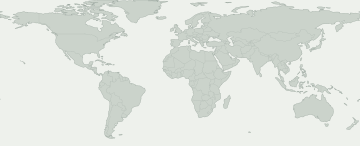
Збірка у джереліСпостереження трекераОзнака за тією самою збіркоюРинки, що охоплюють кілька країн
Виберіть зафарбовану область, щоб переглянути запис про прошивку. Синім позначено широкий ринок, наприклад Європу чи Кавказ, а не запис для кожної країни.
Ринки, що охоплюють кілька країн
Виберіть ринок, щоб переглянути запис і його джерело. Доступність може різнитися в межах зафарбованої області.
Для цього вибору немає регіонів прошивок із точкою на карті. Точні записи дивіться в активності CSC.
Для деяких регіонів прошивки немає місця на карті. Їхні записи все одно є в таблиці.
Охоплення моделей
Моделі та регіони прошивок
Офіційні строки
Офіційні строки
Заяви Samsung показані окремо від перевірок трекера. Враховуйте їхню область дії та спосіб випуску.
Підтверджених офіційних строків тут немає.
Перевірені дані джерела
Перевірені дані джерела
Прийняті записи про збірки цієї версії з точною моделлю, регіоном прошивки та джерелом.
Galaxy S23 Ultra · SM-S918B / INS
S918BXXU3CXCFЗапис про збірку для цієї моделі та регіону прошивки.
Перевірені дані джерела →Докази ↗Примітки джерела до випуску
One UI 6.1 Upgrade Galaxy AI Instantly search for anything on your screen Circle to Search with Google lets you easily learn more about anything shown on your screen without switching apps. Just touch and hold the Home button or navigation handle, then circle anything on the screen to start a Google search. Translate phone calls in real time Need to call someone who doesn't speak your language? No problem! Live translate provides real-time translation during calls. The other person on the call can hear what you say in their language, and you can hear their responses in your language. Translations will also appear on the screen. Translate in-person conversations The new Interpreter feature lets you translate a conversation any time you need to talk to someone who speaks another language. You can access Interpreter easily from the quick panel. Both people can hear translations read out loud in addition to reading them on the screen. Translate text in pictures, signs, documents, and more Instantly translate text wherever you find it. Just point your camera at the text you want to translate, then tap the T button to show more options. You can also translate text that appears in images in your Gallery. Summarize and translate webpages Get the information you need quickly by summarizing webpages with Browsing assist in Samsung Internet. You can reduce a long read into just the most important bullet points. You can also translate webpages into your language. Note smarter, not harder Note assist lets you do more than ever before in Samsung Notes. You can automatically format, summarize, correct, translate, and generate covers for your notes. Automatically transcribe voice recordings Use Transcript assist to convert recordings of meetings, lectures, voice memos, and more into text, then summarize them for quick review. You can even translate the transcripts and summaries to review them in other languages. Do more with Samsung Keyboard Change the tone of your writing to make it sound professional, casual, or ready to post on social media with Writing assist. You can also get spelling and grammar suggestions in addition to message translation in select chat and text messaging apps. Reimagine your photos Generative edit gives you more ways to edit your photos. You can move, remove, or resize the people and objects in your photos, then generate new background to fill in any missing pieces. Generate unique wallpapers Use AI to generate unique wallpapers for your Home screen and Lock screen. Just choose a few keywords and let the AI take care of the rest. Advanced intelligence settings You have full control over which AI features you want to use and how they process your data. You can even block online processing of your data for all features with a single tap. Create epic images Effortlessly enhance your photos Get special AI recommendations for enhancing your photos and videos. You'll find options for adding star trails, long exposure, colorizing, and more. Suggestions appear when you tap the i button in Gallery. Copy and paste from one image to another Add a missing element to your picture. Just clip an object from an image in Gallery, then go to the image where you want to paste it and choose Paste from clipboard in the More options menu. Easily create custom stickers Creating custom stickers has never been easier. After you clip an image in Gallery, you can quickly turn it into a sticker and apply styles such as outline, cutout, vintage, and cartoon. More accurate image clipping Get exactly the area you need to clip without any unwanted parts. When you clip an image in Gallery, you have the option of editing the selected area before you save it so you can get your selection just right. Improved Gallery search The search screen has been redesigned to make it easier to use. Results are now categorized by type, such as people, places, albums, or stories. Change playback speed More videos now support changing the playback speed when you edit a video in Gallery. You can make your video play faster or slower in a specific section that you select or for the entire video. Edit videos on multiple devices You can now continue your edits on your phone, tablet, or PC. Export your Studio projects to a file that can be opened on other Galaxy devices. Customize your Galaxy New wallpaper editing features Decorate your wallpaper however you like. When you select an image to use as your wallpaper, you can now apply frames and effects. When your wallpaper includes a person or animal, you can apply depth effects to make the subject stand out from the background. More widgets for your Lock screen Additional widgets are available for your Lock screen and Always On Display so you can quickly check useful information without unlocking your phone. The new widgets include Weather, Samsung Health, Battery, Reminder, Calendar, and Clock. Customize alarm alerts Use an image, video, or AR emoji to create your own custom alert screens for each alarm. You can even change the layout of where the alarm information appears on the screen. More stickers to personalize your calendar You can now add up to 2 stickers for each date on your calendar. Stickers for events are now shown next to the event name in Month view. Revamped Calendar settings Calendar settings have been reorganized to be more intuitive. You can also set background colors and images for full-screen calendar alerts. Customize reminder alerts Create the right background for each of your reminders. You can now set colors and background images for full-screen reminder alerts. Do more with reminder categories You can now choose a representative icon for each reminder category. You can also pin categories you use frequently to the top of the category list. Turn modes on or off from the Home screen Turn modes on and off more quickly than before. The new Mode widget lets you add modes directly to your Home screen. Reorder your modes You can now change the order that modes are listed on the Modes tab in Modes and Routines. New routine conditions You can now start a routine when an alarm of your choice starts ringing or when Smart View connects or disconnects. Relumino outline Turn on Relumino outline in Accessibility settings to highlight the outlines of objects in images and videos to make them easier to distinguish for people with low vision. Connect and share Share with more devices Quick Share has merged with Google's Nearby Share. In addition to Galaxy devices, you can now share with other Android devices even without an internet connection. Locate your devices The new Samsung Find app lets you see where all your Galaxy devices are on a map any time. If you lose a device, additional features are available to help you find the device and protect your data. Share your location with others With Samsung Find, you can share your location with family, friends, or anyone that you trust. Share for a limited time or all the time. You're always in control of who can see your location. Broadcast sound with Auracast Broadcast the sound from your phone so others can listen. Anyone nearby with a Bluetooth LE Audio device will be able to listen to your broadcast. Sync Internet tab groups with other devices Easily pick up where you left off during your last browsing session no matter which device you were using. Tab groups that you create on one device will appear in Samsung Internet on other Galaxy devices signed in to your Samsung account. Protect your data Enhanced data protection in Samsung Cloud Rest assured that no one can access your data but you, even if there's a data breach. You can turn on end-to-end encryption for data that's synced with Samsung Cloud. Fast and secure sign-ins with passkeys Passkeys provide more security for web sign-ins without the need to remember complicated passwords. Use passkeys to sign in to supported websites with biometric authentication in Samsung Internet. Manage your health Enhanced exercise experience Compete against your past running results in Samsung Health to try to beat your previous time. You can also crop exercises after you finish to remove any unnecessary time at the beginning or end. More options for daily activity targets You now have more options for setting your daily activity targets in Samsung Health. If a step goal doesn't work for you, you can change to floors climbed or active hours instead. Improved cycle tracking When you record your physical symptoms and moods, options you've used frequently in the past will appear at the top of the screen. You can also now set custom moods if the default options don't match how you're feeling. Even more improvements Easier to access Video call effects and Mic mode Video call effects and Mic mode will now appear in the quick panel during voice and video calls so you can control how others see and hear you during calls. You can set a background color or image, focus on your voice by blocking background sounds, and more. More information in the Weather widget The weather widget will let you know when severe thunderstorms, snowfall, or other precipitation is on the forecast in your local area. Voice input without leaving the keyboard The keyboard now remains visible while using voice input so you can easily switch back to typing whenever you need to. Tap the mic button at the bottom of the screen to enter text using your voice at any time while using the keyboard. Open all minimized apps at once A new button lets you reopen all of the minimized apps at once when you have more than one pop-up window minimized. Google search suggestions in Finder When you search using Finder, you’ll also get suggested web searches from Google. More ways to protect your battery Choose from 3 different protection options to help extend your battery's lifespan. Basic protection keeps your charge between 95% and 100%. Adaptive protection pauses charging while you're asleep and finishes charging just before you wake up. You can also choose to limit the maximum charge to 80% for maximum protection.
Galaxy Tab S9 5G · SM-X716B / CAU
X716BXXU4BXHBЗапис про збірку для цієї моделі та регіону прошивки.
Перевірені дані джерела →Докази ↗Примітки джерела до випуску
One UI 6.1.1 Update Galaxy AI Turn simple sketches into awesome images Start with a simple drawing, choose your style, and let Galaxy AI transform it into a captivating work of art. Sketch to image is available in Samsung Notes, Photo Editor, Air command, Smart select, and the Edge panels. Create unique portraits With a wide variety of AI-generated portrait styles, you can create a whole new look for your own profile image in Contacts or someone else’s, or use Photo Editor to invent something new for any of your photos that have faces in them. Let your tablet do the writing for you When you need to write something, whether it’s a text, an email, or a social media post, you can start by giving Samsung Keyboard's new Composer a short request or snippet of text, then let Galaxy AI do the rest. Translate calls in more apps Simply talk over the tablet and get translation in real time, helping you break down language barriers. And now, in addition to the Samsung Phone app, you can get real-time translation in supported voice calling apps like Google Meet and WhatsApp. During a call, tap Live translate in the quick panel to start translating. Translate image text on webpages Get the entire webpage in your language. When you translate a webpage in Samsung Internet, all of the text on the page gets translated, whether it’s formatted as text or part of an image or photo. Translate in Listening mode Listen in, no matter which language is being spoken. Interpreter's new Listening mode lets you translate one-way communication, like a lecture or presentation, into your language. Turn voice recordings into notes It’s easier than ever before to create notes with Samsung Notes, even using just your voice. You can now transcribe voice recordings into text notes that you can edit, summarize, and more. Translate and summarize PDFs Note assist's translation and summary features now work with PDF files without the need to convert them to notes first. Translated text will appear in the original format of the PDF. Auto detect languages in Voice Recorder Use Transcript assist to convert recordings of meetings, lectures, voice memos, and more into text. The language of your recording will now be automatically detected, so you can skip the language choice and go right to the transcript. Edit voice recordings and transcripts After you create a transcript in Voice Recorder, you can now edit the text to fix any errors, remove unneeded parts, or add something that’s missing. You can also edit the audio recording itself by removing sections you don't need. Create epic images Bring photos to life with Live effects Give your subjects a lifelike appearance by applying stunning cinematic effects to people and animals in your photos. Quickly save and share Instant slow-mo clips After watching a video in instant slow-mo, you can save the portion of the video that you slowed down. When you share a video, the last section you watched in slow-mo is also available for sharing. Create fun animated stickers and GIFs Touch and hold any object from a motion photo to clip it, then instantly turn it into an animated sticker or GIF that you can share with others. Clip just what you need Touch and hold a person or object in any photo to clip it. You can now clip multiple items at once. After clipping, you can easily turn your selection into a sticker or copy and paste it somewhere else. Be more productive Suggested actions for Smart select Take action quickly based on what's shown on your screen. When you select something on your screen with Smart select, you'll now get suggested actions related to your selection. You can quickly call phone numbers, locate addresses, enhance images, and more. Smart select can now be accessed in the Apps Edge panel. Enhanced multi window experience It's easier than ever to switch between picture-in-picture and split screen. Touch and hold a video playing in picture-in-picture, then drag it to the side of the screen where you want to play it. Easier file copying and moving It's easier than ever to find the right folder when copying or moving files in My Files. You can now choose the destination folder in a pop-up window so you can easily return the original folder when you're finished. Create file shortcuts on the Home screen Get faster access to the files you use most. Touch and hold any file in My Files, then use your other hand to navigate to the Home screen. Drop the file anywhere on your Home screen to create a shortcut to the file. Improved thumbnail image display See how images will appear before you open them. Thumbnail images for pictures and videos in My Files now appear in the original aspect ratio. Highlight your schedule Mark important dates on your calendar quickly and neatly. Use the straight-line highlighter with your S Pen to mark important dates on your calendar in month view. You can also now erase highlighted sections without erasing other pen marks. More message filtering options When you create a routine that starts when you receive a message or notification, you now have more fine-tuned control. You can add multiple keywords and choose to start the routine when all keywords are included or when any keyword is included in the message or notification. Even more improvements Design and share your profile card Design your own profile card with your name and picture that other Galaxy users can see when you call them or when they view your contact info. You can also create profile cards for other people in your contacts so you can see their card when they call you. Skim through videos quickly Save time and effort with new video seek controls in the Video Player app. Double tap the right side of the screen to go forward 5 seconds. Double tap the left side of the screen to go back 5 seconds. Answer calls with a tap instead of a swipe If you have difficulty swiping, you can set your tablet to answer calls with a simple tap of a button. Get frequent weather updates Stay prepared for sudden weather changes. Weather information now automatically updates at least once every hour to make sure you always have the latest forecasts. Extra-strong security If you have special security needs, you can now set Auto Blocker to apply maximum restrictions to get the highest level of protection against malware and security threats. Hyperlinks and automatic downloading attachments in messages are blocked, location data is removed when sharing pictures, and shared albums in Gallery can't be used. Enhanced Assistant menu You can now open the quick panel with just one tap. You also have greater control of physical buttons. Use the Assistant menu to press and hold or double press the Side button.
Galaxy Tab S9 5G · SM-X716B / CAU
X716BXXU2BXC9Запис про збірку для цієї моделі та регіону прошивки.
Перевірені дані джерела →Докази ↗Примітки джерела до випуску
One UI 6.1 Upgrade Galaxy AI Instantly search for anything on your screen Circle to Search with Google lets you easily learn more about anything shown on your screen without switching apps. Just touch and hold the Home button or navigation handle, then circle anything on the screen to start a Google search. Translate phone calls in real time Need to call someone who doesn't speak your language? No problem! Live translate provides real-time translation during calls. The other person on the call can hear what you say in their language, and you can hear their responses in your language. Translations will also appear on the screen. Translate in-person conversations The new Interpreter feature lets you translate a conversation any time you need to talk to someone who speaks another language. You can access Interpreter easily from the quick panel. Both people can hear translations read out loud in addition to reading them on the screen. Translate text in pictures, signs, documents, and more Instantly translate text wherever you find it. Just point your camera at the text you want to translate, then tap the T button to show more options. You can also translate text that appears in images in your Gallery. Summarize and translate webpages Get the information you need quickly by summarizing webpages with Browsing assist in Samsung Internet. You can reduce a long read into just the most important bullet points. You can also translate webpages into your language. Note smarter, not harder Note assist lets you do more than ever before in Samsung Notes. You can automatically format, summarize, correct, translate, and generate covers for your notes. Automatically transcribe voice recordings Use Transcript assist to convert recordings of meetings, lectures, voice memos, and more into text, then summarize them for quick review. You can even translate the transcripts and summaries to review them in other languages. Do more with Samsung Keyboard Change the tone of your writing to make it sound professional, casual, or ready to post on social media with Writing assist. You can also get spelling and grammar suggestions in addition to message translation in select chat and text messaging apps. Reimagine your photos Generative edit gives you more ways to edit your photos. You can move, remove, or resize the people and objects in your photos, then generate new background to fill in any missing pieces. Generate unique wallpapers Use AI to generate unique wallpapers for your Home screen and Lock screen. Just choose a few keywords and let the AI take care of the rest. Advanced intelligence settings You have full control over which AI features you want to use and how they process your data. You can even block online processing of your data for all features with a single tap. Create epic images Copy and paste from one image to another Add a missing element to your picture. Just clip an object from an image in Gallery, then go to the image where you want to paste it and choose Paste from clipboard in the More options menu. Easily create custom stickers Creating custom stickers has never been easier. After you clip an image in Gallery, you can quickly turn it into a sticker and apply styles such as outline, cutout, vintage, and cartoon. More accurate image clipping Get exactly the area you need to clip without any unwanted parts. When you clip an image in Gallery, you have the option of editing the selected area before you save it so you can get your selection just right. Improved Gallery search The search screen has been redesigned to make it easier to use. Results are now categorized by type, such as people, places, albums, or stories. Change playback speed More videos now support changing the playback speed when you edit a video in Gallery. You can make your video play faster or slower in a specific section that you select or for the entire video. Edit videos on multiple devices You can now continue your edits on your phone, tablet, or PC. Export your Studio projects to a file that can be opened on other Galaxy devices. Customize your Galaxy New wallpaper editing features Decorate your wallpaper however you like. When you select an image to use as your wallpaper, you can now apply frames and effects. When your wallpaper includes a person or animal, you can apply depth effects to make the subject stand out from the background. Customize alarm alerts Use an image, video, or AR emoji to create your own custom alert screens for each alarm. You can even change the layout of where the alarm information appears on the screen. More stickers to personalize your calendar You can now add up to 2 stickers for each date on your calendar. Stickers for events are now shown next to the event name in Month view. Revamped Calendar settings Calendar settings have been reorganized to be more intuitive. You can also set background colors and images for full-screen calendar alerts. Customize reminder alerts Create the right background for each of your reminders. You can now set colors and background images for full-screen reminder alerts. Do more with reminder categories You can now choose a representative icon for each reminder category. You can also pin categories you use frequently to the top of the category list. Turn modes on or off from the Home screen Turn modes on and off more quickly than before. The new Mode widget lets you add modes directly to your Home screen. Reorder your modes You can now change the order that modes are listed on the Modes tab in Modes and Routines. New routine conditions You can now start a routine when an alarm of your choice starts ringing or when Smart View connects or disconnects. Relumino outline Turn on Relumino outline in Accessibility settings to highlight the outlines of objects in images and videos to make them easier to distinguish for people with low vision. Connect and share Share with more devices Quick Share has merged with Google's Nearby Share. In addition to Galaxy devices, you can now share with other Android devices even without an internet connection. Locate your devices The new Samsung Find app lets you see where all your Galaxy devices are on a map any time. If you lose a device, additional features are available to help you find the device and protect your data. Share your location with others With Samsung Find, you can share your location with family, friends, or anyone that you trust. Share for a limited time or all the time. You're always in control of who can see your location. Broadcast sound with Auracast Broadcast the sound from your phone so others can listen. Anyone nearby with a Bluetooth LE Audio device will be able to listen to your broadcast. Sync Internet tab groups with other devices Easily pick up where you left off during your last browsing session no matter which device you were using. Tab groups that you create on one device will appear in Samsung Internet on other Galaxy devices signed in to your Samsung account. Protect your data Enhanced data protection in Samsung Cloud Rest assured that no one can access your data but you, even if there's a data breach. You can turn on end-to-end encryption for data that's synced with Samsung Cloud. Fast and secure sign-ins with passkeys Passkeys provide more security for web sign-ins without the need to remember complicated passwords. Use passkeys to sign in to supported websites with biometric authentication in Samsung Internet. Manage your health Enhanced exercise experience Compete against your past running results in Samsung Health to try to beat your previous time. You can also crop exercises after you finish to remove any unnecessary time at the beginning or end. More options for daily activity targets You now have more options for setting your daily activity targets in Samsung Health. If a step goal doesn't work for you, you can change to floors climbed or active hours instead. Improved cycle tracking When you record your physical symptoms and moods, options you've used frequently in the past will appear at the top of the screen. You can also now set custom moods if the default options don't match how you're feeling. Even more improvements Easier to access Video call effects and Mic mode Video call effects and Mic mode will now appear in the quick panel during voice and video calls so you can control how others see and hear you during calls. You can set a background color or image, focus on your voice by blocking background sounds, and more. More information in the Weather widget The weather widget will let you know when severe thunderstorms, snowfall, or other precipitation is on the forecast in your local area. Voice input without leaving the keyboard The keyboard now remains visible while using voice input so you can easily switch back to typing whenever you need to. Tap the mic button at the bottom of the screen to enter text using your voice at any time while using the keyboard. Open all minimized apps at once A new button lets you reopen all of the minimized apps at once when you have more than one pop-up window minimized. Google search suggestions in Finder When you search using Finder, you’ll also get suggested web searches from Google. More ways to protect your battery Choose from 3 different protection options to help extend your battery's lifespan. Basic protection keeps your charge between 95% and 100%. Adaptive protection pauses charging while you're asleep and finishes charging just before you wake up. You can also choose to limit the maximum charge to 80% for maximum protection.
Galaxy S23 · SM-S911B / XSG
S911BXXU3CXCFЗапис про збірку для цієї моделі та регіону прошивки.
Перевірені дані джерела →Докази ↗Примітки джерела до випуску
One UI 6.1 Upgrade Galaxy AI Instantly search for anything on your screen Circle to Search with Google lets you easily learn more about anything shown on your screen without switching apps. Just touch and hold the Home button or navigation handle, then circle anything on the screen to start a Google search. Translate phone calls in real time Need to call someone who doesn't speak your language? No problem! Live translate provides real-time translation during calls. The other person on the call can hear what you say in their language, and you can hear their responses in your language. Translations will also appear on the screen. Translate in-person conversations The new Interpreter feature lets you translate a conversation any time you need to talk to someone who speaks another language. You can access Interpreter easily from the quick panel. Both people can hear translations read out loud in addition to reading them on the screen. Translate text in pictures, signs, documents, and more Instantly translate text wherever you find it. Just point your camera at the text you want to translate, then tap the T button to show more options. You can also translate text that appears in images in your Gallery. Summarize and translate webpages Get the information you need quickly by summarizing webpages with Browsing assist in Samsung Internet. You can reduce a long read into just the most important bullet points. You can also translate webpages into your language. Note smarter, not harder Note assist lets you do more than ever before in Samsung Notes. You can automatically format, summarize, correct, translate, and generate covers for your notes. Automatically transcribe voice recordings Use Transcript assist to convert recordings of meetings, lectures, voice memos, and more into text, then summarize them for quick review. You can even translate the transcripts and summaries to review them in other languages. Do more with Samsung Keyboard Change the tone of your writing to make it sound professional, casual, or ready to post on social media with Writing assist. You can also get spelling and grammar suggestions in addition to message translation in select chat and text messaging apps. Reimagine your photos Generative edit gives you more ways to edit your photos. You can move, remove, or resize the people and objects in your photos, then generate new background to fill in any missing pieces. Generate unique wallpapers Use AI to generate unique wallpapers for your Home screen and Lock screen. Just choose a few keywords and let the AI take care of the rest. Advanced intelligence settings You have full control over which AI features you want to use and how they process your data. You can even block online processing of your data for all features with a single tap. Create epic images Effortlessly enhance your photos Get special AI recommendations for enhancing your photos and videos. You'll find options for adding star trails, long exposure, colorizing, and more. Suggestions appear when you tap the i button in Gallery. Copy and paste from one image to another Add a missing element to your picture. Just clip an object from an image in Gallery, then go to the image where you want to paste it and choose Paste from clipboard in the More options menu. Easily create custom stickers Creating custom stickers has never been easier. After you clip an image in Gallery, you can quickly turn it into a sticker and apply styles such as outline, cutout, vintage, and cartoon. More accurate image clipping Get exactly the area you need to clip without any unwanted parts. When you clip an image in Gallery, you have the option of editing the selected area before you save it so you can get your selection just right. Improved Gallery search The search screen has been redesigned to make it easier to use. Results are now categorized by type, such as people, places, albums, or stories. Change playback speed More videos now support changing the playback speed when you edit a video in Gallery. You can make your video play faster or slower in a specific section that you select or for the entire video. Edit videos on multiple devices You can now continue your edits on your phone, tablet, or PC. Export your Studio projects to a file that can be opened on other Galaxy devices. Customize your Galaxy New wallpaper editing features Decorate your wallpaper however you like. When you select an image to use as your wallpaper, you can now apply frames and effects. When your wallpaper includes a person or animal, you can apply depth effects to make the subject stand out from the background. More widgets for your Lock screen Additional widgets are available for your Lock screen and Always On Display so you can quickly check useful information without unlocking your phone. The new widgets include Weather, Samsung Health, Battery, Reminder, Calendar, and Clock. Customize alarm alerts Use an image, video, or AR emoji to create your own custom alert screens for each alarm. You can even change the layout of where the alarm information appears on the screen. More stickers to personalize your calendar You can now add up to 2 stickers for each date on your calendar. Stickers for events are now shown next to the event name in Month view. Revamped Calendar settings Calendar settings have been reorganized to be more intuitive. You can also set background colors and images for full-screen calendar alerts. Customize reminder alerts Create the right background for each of your reminders. You can now set colors and background images for full-screen reminder alerts. Do more with reminder categories You can now choose a representative icon for each reminder category. You can also pin categories you use frequently to the top of the category list. Turn modes on or off from the Home screen Turn modes on and off more quickly than before. The new Mode widget lets you add modes directly to your Home screen. Reorder your modes You can now change the order that modes are listed on the Modes tab in Modes and Routines. New routine conditions You can now start a routine when an alarm of your choice starts ringing or when Smart View connects or disconnects. Relumino outline Turn on Relumino outline in Accessibility settings to highlight the outlines of objects in images and videos to make them easier to distinguish for people with low vision. Connect and share Share with more devices Quick Share has merged with Google's Nearby Share. In addition to Galaxy devices, you can now share with other Android devices even without an internet connection. Locate your devices The new Samsung Find app lets you see where all your Galaxy devices are on a map any time. If you lose a device, additional features are available to help you find the device and protect your data. Share your location with others With Samsung Find, you can share your location with family, friends, or anyone that you trust. Share for a limited time or all the time. You're always in control of who can see your location. Broadcast sound with Auracast Broadcast the sound from your phone so others can listen. Anyone nearby with a Bluetooth LE Audio device will be able to listen to your broadcast. Sync Internet tab groups with other devices Easily pick up where you left off during your last browsing session no matter which device you were using. Tab groups that you create on one device will appear in Samsung Internet on other Galaxy devices signed in to your Samsung account. Protect your data Enhanced data protection in Samsung Cloud Rest assured that no one can access your data but you, even if there's a data breach. You can turn on end-to-end encryption for data that's synced with Samsung Cloud. Fast and secure sign-ins with passkeys Passkeys provide more security for web sign-ins without the need to remember complicated passwords. Use passkeys to sign in to supported websites with biometric authentication in Samsung Internet. Manage your health Enhanced exercise experience Compete against your past running results in Samsung Health to try to beat your previous time. You can also crop exercises after you finish to remove any unnecessary time at the beginning or end. More options for daily activity targets You now have more options for setting your daily activity targets in Samsung Health. If a step goal doesn't work for you, you can change to floors climbed or active hours instead. Improved cycle tracking When you record your physical symptoms and moods, options you've used frequently in the past will appear at the top of the screen. You can also now set custom moods if the default options don't match how you're feeling. Even more improvements Easier to access Video call effects and Mic mode Video call effects and Mic mode will now appear in the quick panel during voice and video calls so you can control how others see and hear you during calls. You can set a background color or image, focus on your voice by blocking background sounds, and more. More information in the Weather widget The weather widget will let you know when severe thunderstorms, snowfall, or other precipitation is on the forecast in your local area. Voice input without leaving the keyboard The keyboard now remains visible while using voice input so you can easily switch back to typing whenever you need to. Tap the mic button at the bottom of the screen to enter text using your voice at any time while using the keyboard. Open all minimized apps at once A new button lets you reopen all of the minimized apps at once when you have more than one pop-up window minimized. Google search suggestions in Finder When you search using Finder, you’ll also get suggested web searches from Google. More ways to protect your battery Choose from 3 different protection options to help extend your battery's lifespan. Basic protection keeps your charge between 95% and 100%. Adaptive protection pauses charging while you're asleep and finishes charging just before you wake up. You can also choose to limit the maximum charge to 80% for maximum protection.
Galaxy A73 5G · SM-A736B / CAU
A736BXXU7EXDCЗапис про збірку для цієї моделі та регіону прошивки.
Перевірені дані джерела →Докази ↗Примітки джерела до випуску
One UI 6.1 Upgrade Create epic images Copy and paste from one image to another Add a missing element to your picture. Just clip an object from an image in Gallery, then go to the image where you want to paste it and choose Paste from clipboard in the More options menu. More accurate image clipping Get exactly the area you need to clip without any unwanted parts. When you clip an image in Gallery, you have the option of editing the selected area before you save it so you can get your selection just right. Improved Gallery search The search screen has been redesigned to make it easier to use. Results are now categorized by type, such as people, places, albums, or stories. Change playback speed More videos now support changing the playback speed when you edit a video in Gallery. You can make your video play faster or slower in a specific section that you select or for the entire video. Edit videos on multiple devices You can now continue your edits on your phone, tablet, or PC. Export your Studio projects to a file that can be opened on other Galaxy devices. Customize your Galaxy New wallpaper editing features Decorate your wallpaper however you like. When you select an image to use as your wallpaper, you can now apply frames and effects. When your wallpaper includes a person or animal, you can apply depth effects to make the subject stand out from the background. More widgets for your Lock screen Additional widgets are available for your Lock screen and Always On Display so you can quickly check useful information without unlocking your phone. The new widgets include Weather, Samsung Health, Battery, Reminder, Calendar, and Clock. Customize alarm alerts Use an image, video, or AR emoji to create your own custom alert screens for each alarm. You can even change the layout of where the alarm information appears on the screen. More stickers to personalize your calendar You can now add up to 2 stickers for each date on your calendar. Stickers for events are now shown next to the event name in Month view. Revamped Calendar settings Calendar settings have been reorganized to be more intuitive. You can also set background colors and images for full-screen calendar alerts. Customize reminder alerts Create the right background for each of your reminders. You can now set colors and background images for full-screen reminder alerts. Do more with reminder categories You can now choose a representative icon for each reminder category. You can also pin categories you use frequently to the top of the category list. Turn modes on or off from the Home screen Turn modes on and off more quickly than before. The new Mode widget lets you add modes directly to your Home screen. Reorder your modes You can now change the order that modes are listed on the Modes tab in Modes and Routines. New routine conditions You can now start a routine when an alarm of your choice starts ringing or when Smart View connects or disconnects. Relumino outline Turn on Relumino outline in Accessibility settings to highlight the outlines of objects in images and videos to make them easier to distinguish for people with low vision. Connect and share Share with more devices Quick Share has merged with Google's Nearby Share. In addition to Galaxy devices, you can now share with other Android devices even without an internet connection. Locate your devices The new Samsung Find app lets you see where all your Galaxy devices are on a map any time. If you lose a device, additional features are available to help you find the device and protect your data. Share your location with others With Samsung Find, you can share your location with family, friends, or anyone that you trust. Share for a limited time or all the time. You're always in control of who can see your location. Sync Internet tab groups with other devices Easily pick up where you left off during your last browsing session no matter which device you were using. Tab groups that you create on one device will appear in Samsung Internet on other Galaxy devices signed in to your Samsung account. Protect your data Enhanced data protection in Samsung Cloud Rest assured that no one can access your data but you, even if there's a data breach. You can turn on end-to-end encryption for data that's synced with Samsung Cloud. Fast and secure sign-ins with passkeys Passkeys provide more security for web sign-ins without the need to remember complicated passwords. Use passkeys to sign in to supported websites with biometric authentication in Samsung Internet. Manage your health Enhanced exercise experience Compete against your past running results in Samsung Health to try to beat your previous time. You can also crop exercises after you finish to remove any unnecessary time at the beginning or end. More options for daily activity targets You now have more options for setting your daily activity targets in Samsung Health. If a step goal doesn't work for you, you can change to floors climbed or active hours instead. Improved cycle tracking When you record your physical symptoms and moods, options you've used frequently in the past will appear at the top of the screen. You can also now set custom moods if the default options don't match how you're feeling. Even more improvements Easier to access Video call effects and Mic mode Video call effects and Mic mode will now appear in the quick panel during voice and video calls so you can control how others see and hear you during calls. You can set a background color or image, focus on your voice by blocking background sounds, and more. More information in the Weather widget The weather widget will let you know when severe thunderstorms, snowfall, or other precipitation is on the forecast in your local area. Voice input without leaving the keyboard The keyboard now remains visible while using voice input so you can easily switch back to typing whenever you need to. Tap the mic button at the bottom of the screen to enter text using your voice at any time while using the keyboard. Open all minimized apps at once A new button lets you reopen all of the minimized apps at once when you have more than one pop-up window minimized. Google search suggestions in Finder When you search using Finder, you’ll also get suggested web searches from Google. More ways to protect your battery Choose from 3 different protection options to help extend your battery's lifespan. Basic protection keeps your charge between 95% and 100%. Adaptive protection pauses charging while you're asleep and finishes charging just before you wake up. You can also choose to limit the maximum charge to 80% for maximum protection.
Galaxy S23+ · SM-S916B / EUX
S916BXXU3CXCFЗапис про збірку для цієї моделі та регіону прошивки.
Перевірені дані джерела →Докази ↗Примітки джерела до випуску
One UI 6.1 Upgrade Galaxy AI Instantly search for anything on your screen Circle to Search with Google lets you easily learn more about anything shown on your screen without switching apps. Just touch and hold the Home button or navigation handle, then circle anything on the screen to start a Google search. Translate phone calls in real time Need to call someone who doesn't speak your language? No problem! Live translate provides real-time translation during calls. The other person on the call can hear what you say in their language, and you can hear their responses in your language. Translations will also appear on the screen. Translate in-person conversations The new Interpreter feature lets you translate a conversation any time you need to talk to someone who speaks another language. You can access Interpreter easily from the quick panel. Both people can hear translations read out loud in addition to reading them on the screen. Translate text in pictures, signs, documents, and more Instantly translate text wherever you find it. Just point your camera at the text you want to translate, then tap the T button to show more options. You can also translate text that appears in images in your Gallery. Summarize and translate webpages Get the information you need quickly by summarizing webpages with Browsing assist in Samsung Internet. You can reduce a long read into just the most important bullet points. You can also translate webpages into your language. Note smarter, not harder Note assist lets you do more than ever before in Samsung Notes. You can automatically format, summarize, correct, translate, and generate covers for your notes. Automatically transcribe voice recordings Use Transcript assist to convert recordings of meetings, lectures, voice memos, and more into text, then summarize them for quick review. You can even translate the transcripts and summaries to review them in other languages. Do more with Samsung Keyboard Change the tone of your writing to make it sound professional, casual, or ready to post on social media with Writing assist. You can also get spelling and grammar suggestions in addition to message translation in select chat and text messaging apps. Reimagine your photos Generative edit gives you more ways to edit your photos. You can move, remove, or resize the people and objects in your photos, then generate new background to fill in any missing pieces. Generate unique wallpapers Use AI to generate unique wallpapers for your Home screen and Lock screen. Just choose a few keywords and let the AI take care of the rest. Advanced intelligence settings You have full control over which AI features you want to use and how they process your data. You can even block online processing of your data for all features with a single tap. Create epic images Effortlessly enhance your photos Get special AI recommendations for enhancing your photos and videos. You'll find options for adding star trails, long exposure, colorizing, and more. Suggestions appear when you tap the i button in Gallery. Copy and paste from one image to another Add a missing element to your picture. Just clip an object from an image in Gallery, then go to the image where you want to paste it and choose Paste from clipboard in the More options menu. Easily create custom stickers Creating custom stickers has never been easier. After you clip an image in Gallery, you can quickly turn it into a sticker and apply styles such as outline, cutout, vintage, and cartoon. More accurate image clipping Get exactly the area you need to clip without any unwanted parts. When you clip an image in Gallery, you have the option of editing the selected area before you save it so you can get your selection just right. Improved Gallery search The search screen has been redesigned to make it easier to use. Results are now categorized by type, such as people, places, albums, or stories. Change playback speed More videos now support changing the playback speed when you edit a video in Gallery. You can make your video play faster or slower in a specific section that you select or for the entire video. Edit videos on multiple devices You can now continue your edits on your phone, tablet, or PC. Export your Studio projects to a file that can be opened on other Galaxy devices. Customize your Galaxy New wallpaper editing features Decorate your wallpaper however you like. When you select an image to use as your wallpaper, you can now apply frames and effects. When your wallpaper includes a person or animal, you can apply depth effects to make the subject stand out from the background. More widgets for your Lock screen Additional widgets are available for your Lock screen and Always On Display so you can quickly check useful information without unlocking your phone. The new widgets include Weather, Samsung Health, Battery, Reminder, Calendar, and Clock. Customize alarm alerts Use an image, video, or AR emoji to create your own custom alert screens for each alarm. You can even change the layout of where the alarm information appears on the screen. More stickers to personalize your calendar You can now add up to 2 stickers for each date on your calendar. Stickers for events are now shown next to the event name in Month view. Revamped Calendar settings Calendar settings have been reorganized to be more intuitive. You can also set background colors and images for full-screen calendar alerts. Customize reminder alerts Create the right background for each of your reminders. You can now set colors and background images for full-screen reminder alerts. Do more with reminder categories You can now choose a representative icon for each reminder category. You can also pin categories you use frequently to the top of the category list. Turn modes on or off from the Home screen Turn modes on and off more quickly than before. The new Mode widget lets you add modes directly to your Home screen. Reorder your modes You can now change the order that modes are listed on the Modes tab in Modes and Routines. New routine conditions You can now start a routine when an alarm of your choice starts ringing or when Smart View connects or disconnects. Relumino outline Turn on Relumino outline in Accessibility settings to highlight the outlines of objects in images and videos to make them easier to distinguish for people with low vision. Connect and share Share with more devices Quick Share has merged with Google's Nearby Share. In addition to Galaxy devices, you can now share with other Android devices even without an internet connection. Locate your devices The new Samsung Find app lets you see where all your Galaxy devices are on a map any time. If you lose a device, additional features are available to help you find the device and protect your data. Share your location with others With Samsung Find, you can share your location with family, friends, or anyone that you trust. Share for a limited time or all the time. You're always in control of who can see your location. Broadcast sound with Auracast Broadcast the sound from your phone so others can listen. Anyone nearby with a Bluetooth LE Audio device will be able to listen to your broadcast. Sync Internet tab groups with other devices Easily pick up where you left off during your last browsing session no matter which device you were using. Tab groups that you create on one device will appear in Samsung Internet on other Galaxy devices signed in to your Samsung account. Protect your data Enhanced data protection in Samsung Cloud Rest assured that no one can access your data but you, even if there's a data breach. You can turn on end-to-end encryption for data that's synced with Samsung Cloud. Fast and secure sign-ins with passkeys Passkeys provide more security for web sign-ins without the need to remember complicated passwords. Use passkeys to sign in to supported websites with biometric authentication in Samsung Internet. Manage your health Enhanced exercise experience Compete against your past running results in Samsung Health to try to beat your previous time. You can also crop exercises after you finish to remove any unnecessary time at the beginning or end. More options for daily activity targets You now have more options for setting your daily activity targets in Samsung Health. If a step goal doesn't work for you, you can change to floors climbed or active hours instead. Improved cycle tracking When you record your physical symptoms and moods, options you've used frequently in the past will appear at the top of the screen. You can also now set custom moods if the default options don't match how you're feeling. Even more improvements Easier to access Video call effects and Mic mode Video call effects and Mic mode will now appear in the quick panel during voice and video calls so you can control how others see and hear you during calls. You can set a background color or image, focus on your voice by blocking background sounds, and more. More information in the Weather widget The weather widget will let you know when severe thunderstorms, snowfall, or other precipitation is on the forecast in your local area. Voice input without leaving the keyboard The keyboard now remains visible while using voice input so you can easily switch back to typing whenever you need to. Tap the mic button at the bottom of the screen to enter text using your voice at any time while using the keyboard. Open all minimized apps at once A new button lets you reopen all of the minimized apps at once when you have more than one pop-up window minimized. Google search suggestions in Finder When you search using Finder, you’ll also get suggested web searches from Google. More ways to protect your battery Choose from 3 different protection options to help extend your battery's lifespan. Basic protection keeps your charge between 95% and 100%. Adaptive protection pauses charging while you're asleep and finishes charging just before you wake up. You can also choose to limit the maximum charge to 80% for maximum protection.
Galaxy A34 5G · SM-A346E / SKZ
A346EXXU6CXDBЗапис про збірку для цієї моделі та регіону прошивки.
Перевірені дані джерела →Докази ↗Примітки джерела до випуску
One UI 6.1 Upgrade Create epic images Copy and paste from one image to another Add a missing element to your picture. Just clip an object from an image in Gallery, then go to the image where you want to paste it and choose Paste from clipboard in the More options menu. More accurate image clipping Get exactly the area you need to clip without any unwanted parts. When you clip an image in Gallery, you have the option of editing the selected area before you save it so you can get your selection just right. Improved Gallery search The search screen has been redesigned to make it easier to use. Results are now categorized by type, such as people, places, albums, or stories. Change playback speed More videos now support changing the playback speed when you edit a video in Gallery. You can make your video play faster or slower in a specific section that you select or for the entire video. Edit videos on multiple devices You can now continue your edits on your phone, tablet, or PC. Export your Studio projects to a file that can be opened on other Galaxy devices. Customize your Galaxy New wallpaper editing features Decorate your wallpaper however you like. When you select an image to use as your wallpaper, you can now apply frames and effects. When your wallpaper includes a person or animal, you can apply depth effects to make the subject stand out from the background. More widgets for your Lock screen Additional widgets are available for your Lock screen and Always On Display so you can quickly check useful information without unlocking your phone. The new widgets include Weather, Samsung Health, Battery, Reminder, Calendar, and Clock. Customize alarm alerts Use an image, video, or AR emoji to create your own custom alert screens for each alarm. You can even change the layout of where the alarm information appears on the screen. More stickers to personalize your calendar You can now add up to 2 stickers for each date on your calendar. Stickers for events are now shown next to the event name in Month view. Revamped Calendar settings Calendar settings have been reorganized to be more intuitive. You can also set background colors and images for full-screen calendar alerts. Customize reminder alerts Create the right background for each of your reminders. You can now set colors and background images for full-screen reminder alerts. Do more with reminder categories You can now choose a representative icon for each reminder category. You can also pin categories you use frequently to the top of the category list. Turn modes on or off from the Home screen Turn modes on and off more quickly than before. The new Mode widget lets you add modes directly to your Home screen. Reorder your modes You can now change the order that modes are listed on the Modes tab in Modes and Routines. New routine conditions You can now start a routine when an alarm of your choice starts ringing or when Smart View connects or disconnects. Connect and share Share with more devices Quick Share has merged with Google's Nearby Share. In addition to Galaxy devices, you can now share with other Android devices even without an internet connection. Locate your devices The new Samsung Find app lets you see where all your Galaxy devices are on a map any time. If you lose a device, additional features are available to help you find the device and protect your data. Share your location with others With Samsung Find, you can share your location with family, friends, or anyone that you trust. Share for a limited time or all the time. You're always in control of who can see your location. Sync Internet tab groups with other devices Easily pick up where you left off during your last browsing session no matter which device you were using. Tab groups that you create on one device will appear in Samsung Internet on other Galaxy devices signed in to your Samsung account. Protect your data Enhanced data protection in Samsung Cloud Rest assured that no one can access your data but you, even if there's a data breach. You can turn on end-to-end encryption for data that's synced with Samsung Cloud. Fast and secure sign-ins with passkeys Passkeys provide more security for web sign-ins without the need to remember complicated passwords. Use passkeys to sign in to supported websites with biometric authentication in Samsung Internet. Manage your health Enhanced exercise experience Compete against your past running results in Samsung Health to try to beat your previous time. You can also crop exercises after you finish to remove any unnecessary time at the beginning or end. More options for daily activity targets You now have more options for setting your daily activity targets in Samsung Health. If a step goal doesn't work for you, you can change to floors climbed or active hours instead. Improved cycle tracking When you record your physical symptoms and moods, options you've used frequently in the past will appear at the top of the screen. You can also now set custom moods if the default options don't match how you're feeling. Even more improvements Easier to access Video call effects and Mic mode Video call effects and Mic mode will now appear in the quick panel during voice and video calls so you can control how others see and hear you during calls. You can set a background color or image, focus on your voice by blocking background sounds, and more. More information in the Weather widget The weather widget will let you know when severe thunderstorms, snowfall, or other precipitation is on the forecast in your local area. Voice input without leaving the keyboard The keyboard now remains visible while using voice input so you can easily switch back to typing whenever you need to. Tap the mic button at the bottom of the screen to enter text using your voice at any time while using the keyboard. Open all minimized apps at once A new button lets you reopen all of the minimized apps at once when you have more than one pop-up window minimized. Google search suggestions in Finder When you search using Finder, you’ll also get suggested web searches from Google. More ways to protect your battery Choose from 3 different protection options to help extend your battery's lifespan. Basic protection keeps your charge between 95% and 100%. Adaptive protection pauses charging while you're asleep and finishes charging just before you wake up. You can also choose to limit the maximum charge to 80% for maximum protection.
Galaxy Tab S8 · SM-X700 / SER
X700XXU8CXHBЗапис про збірку для цієї моделі та регіону прошивки.
Перевірені дані джерела →Докази ↗Примітки джерела до випуску
One UI 6.1.1 Update Galaxy AI Turn simple sketches into awesome images Start with a simple drawing, choose your style, and let Galaxy AI transform it into a captivating work of art. Sketch to image is available in Samsung Notes, Photo Editor, Air command, Smart select, and the Edge panels. Create unique portraits With a wide variety of AI-generated portrait styles, you can create a whole new look for your own profile image in Contacts or someone else’s, or use Photo Editor to invent something new for any of your photos that have faces in them. Let your tablet do the writing for you When you need to write something, whether it’s a text, an email, or a social media post, you can start by giving Samsung Keyboard's new Composer a short request or snippet of text, then let Galaxy AI do the rest. Translate image text on webpages Get the entire webpage in your language. When you translate a webpage in Samsung Internet, all of the text on the page gets translated, whether it’s formatted as text or part of an image or photo. Translate in Listening mode Listen in, no matter which language is being spoken. Interpreter's new Listening mode lets you translate one-way communication, like a lecture or presentation, into your language. Turn voice recordings into notes It’s easier than ever before to create notes with Samsung Notes, even using just your voice. You can now transcribe voice recordings into text notes that you can edit, summarize, and more. Translate and summarize PDFs Note assist's translation and summary features now work with PDF files without the need to convert them to notes first. Translated text will appear in the original format of the PDF. Auto detect languages in Voice Recorder Use Transcript assist to convert recordings of meetings, lectures, voice memos, and more into text. The language of your recording will now be automatically detected, so you can skip the language choice and go right to the transcript. Edit voice recordings and transcripts After you create a transcript in Voice Recorder, you can now edit the text to fix any errors, remove unneeded parts, or add something that’s missing. You can also edit the audio recording itself by removing sections you don't need. Create epic images Bring photos to life with Live effects Give your subjects a lifelike appearance by applying stunning cinematic effects to people and animals in your photos. Create fun animated stickers and GIFs Touch and hold any object from a motion photo to clip it, then instantly turn it into an animated sticker or GIF that you can share with others. Clip just what you need Touch and hold a person or object in any photo to clip it. You can now clip multiple items at once. After clipping, you can easily turn your selection into a sticker or copy and paste it somewhere else. Be more productive Suggested actions for Smart select Take action quickly based on what's shown on your screen. When you select something on your screen with Smart select, you'll now get suggested actions related to your selection. You can quickly call phone numbers, locate addresses, enhance images, and more. Smart select can now be accessed in the Apps Edge panel. Enhanced multi window experience It's easier than ever to switch between picture-in-picture and split screen. Touch and hold a video playing in picture-in-picture, then drag it to the side of the screen where you want to play it. Easier file copying and moving It's easier than ever to find the right folder when copying or moving files in My Files. You can now choose the destination folder in a pop-up window so you can easily return the original folder when you're finished. Create file shortcuts on the Home screen Get faster access to the files you use most. Touch and hold any file in My Files, then use your other hand to navigate to the Home screen. Drop the file anywhere on your Home screen to create a shortcut to the file. Improved thumbnail image display See how images will appear before you open them. Thumbnail images for pictures and videos in My Files now appear in the original aspect ratio. Highlight your schedule Mark important dates on your calendar quickly and neatly. Use the straight-line highlighter with your S Pen to mark important dates on your calendar in month view. You can also now erase highlighted sections without erasing other pen marks. More message filtering options When you create a routine that starts when you receive a message or notification, you now have more fine-tuned control. You can add multiple keywords and choose to start the routine when all keywords are included or when any keyword is included in the message or notification. Even more improvements Design and share your profile card Design your own profile card with your name and picture that other Galaxy users can see when you call them or when they view your contact info. You can also create profile cards for other people in your contacts so you can see their card when they call you. Skim through videos quickly Save time and effort with new video seek controls in the Video Player app. Double tap the right side of the screen to go forward 5 seconds. Double tap the left side of the screen to go back 5 seconds. Answer calls with a tap instead of a swipe If you have difficulty swiping, you can set your tablet to answer calls with a simple tap of a button. Get frequent weather updates Stay prepared for sudden weather changes. Weather information now automatically updates at least once every hour to make sure you always have the latest forecasts. Extra-strong security If you have special security needs, you can now set Auto Blocker to apply maximum restrictions to get the highest level of protection against malware and security threats. Hyperlinks and automatic downloading attachments in messages are blocked, location data is removed when sharing pictures, and shared albums in Gallery can't be used. Enhanced Assistant menu You can now open the quick panel with just one tap. You also have greater control of physical buttons. Use the Assistant menu to press and hold or double press the Side button.
Galaxy Tab S8 · SM-X700 / SER
X700XXU6CXE2Запис про збірку для цієї моделі та регіону прошивки.
Перевірені дані джерела →Докази ↗Примітки джерела до випуску
One UI 6.1 Upgrade Galaxy AI Instantly search for anything on your screen Circle to Search with Google lets you easily learn more about anything shown on your screen without switching apps. Just touch and hold the Home button or navigation handle, then circle anything on the screen to start a Google search. Translate in-person conversations The new Interpreter feature lets you translate a conversation any time you need to talk to someone who speaks another language. You can access Interpreter easily from the quick panel. Both people can hear translations read out loud in addition to reading them on the screen. Translate text in pictures, signs, documents, and more Instantly translate text wherever you find it. Just point your camera at the text you want to translate, then tap the T button to show more options. You can also translate text that appears in images in your Gallery. Summarize and translate webpages Get the information you need quickly by summarizing webpages with Browsing assist in Samsung Internet. You can reduce a long read into just the most important bullet points. You can also translate webpages into your language. Note smarter, not harder Note assist lets you do more than ever before in Samsung Notes. You can automatically format, summarize, correct, translate, and generate covers for your notes. Automatically transcribe voice recordings Use Transcript assist to convert recordings of meetings, lectures, voice memos, and more into text, then summarize them for quick review. You can even translate the transcripts and summaries to review them in other languages. Do more with Samsung Keyboard Change the tone of your writing to make it sound professional, casual, or ready to post on social media with Writing assist. You can also get spelling and grammar suggestions in addition to message translation in select chat and text messaging apps. Reimagine your photos Generative edit gives you more ways to edit your photos. You can move, remove, or resize the people and objects in your photos, then generate new background to fill in any missing pieces. Generate unique wallpapers Use AI to generate unique wallpapers for your Home screen and Lock screen. Just choose a few keywords and let the AI take care of the rest. Advanced intelligence settings You have full control over which AI features you want to use and how they process your data. You can even block online processing of your data for all features with a single tap. Create epic images Copy and paste from one image to another Add a missing element to your picture. Just clip an object from an image in Gallery, then go to the image where you want to paste it and choose Paste from clipboard in the More options menu. Easily create custom stickers Creating custom stickers has never been easier. After you clip an image in Gallery, you can quickly turn it into a sticker and apply styles such as outline, cutout, vintage, and cartoon. More accurate image clipping Get exactly the area you need to clip without any unwanted parts. When you clip an image in Gallery, you have the option of editing the selected area before you save it so you can get your selection just right. Improved Gallery search The search screen has been redesigned to make it easier to use. Results are now categorized by type, such as people, places, albums, or stories. Change playback speed More videos now support changing the playback speed when you edit a video in Gallery. You can make your video play faster or slower in a specific section that you select or for the entire video. Edit videos on multiple devices You can now continue your edits on your phone, tablet, or PC. Export your Studio projects to a file that can be opened on other Galaxy devices. Customize your Galaxy New wallpaper editing features Decorate your wallpaper however you like. When you select an image to use as your wallpaper, you can now apply frames and effects. When your wallpaper includes a person or animal, you can apply depth effects to make the subject stand out from the background. Customize alarm alerts Use an image, video, or AR emoji to create your own custom alert screens for each alarm. You can even change the layout of where the alarm information appears on the screen. More stickers to personalize your calendar You can now add up to 2 stickers for each date on your calendar. Stickers for events are now shown next to the event name in Month view. Revamped Calendar settings Calendar settings have been reorganized to be more intuitive. You can also set background colors and images for full-screen calendar alerts. Customize reminder alerts Create the right background for each of your reminders. You can now set colors and background images for full-screen reminder alerts. Do more with reminder categories You can now choose a representative icon for each reminder category. You can also pin categories you use frequently to the top of the category list. Turn modes on or off from the Home screen Turn modes on and off more quickly than before. The new Mode widget lets you add modes directly to your Home screen. Reorder your modes You can now change the order that modes are listed on the Modes tab in Modes and Routines. New routine conditions You can now start a routine when an alarm of your choice starts ringing or when Smart View connects or disconnects. Relumino outline Turn on Relumino outline in Accessibility settings to highlight the outlines of objects in images and videos to make them easier to distinguish for people with low vision. Connect and share Share with more devices Quick Share has merged with Google's Nearby Share. In addition to Galaxy devices, you can now share with other Android devices even without an internet connection. Sync Internet tab groups with other devices Easily pick up where you left off during your last browsing session no matter which device you were using. Tab groups that you create on one device will appear in Samsung Internet on other Galaxy devices signed in to your Samsung account. Protect your data Enhanced data protection in Samsung Cloud Rest assured that no one can access your data but you, even if there's a data breach. You can turn on end-to-end encryption for data that's synced with Samsung Cloud. Fast and secure sign-ins with passkeys Passkeys provide more security for web sign-ins without the need to remember complicated passwords. Use passkeys to sign in to supported websites with biometric authentication in Samsung Internet. Manage your health Enhanced exercise experience Compete against your past running results in Samsung Health to try to beat your previous time. You can also crop exercises after you finish to remove any unnecessary time at the beginning or end. More options for daily activity targets You now have more options for setting your daily activity targets in Samsung Health. If a step goal doesn't work for you, you can change to floors climbed or active hours instead. Improved cycle tracking When you record your physical symptoms and moods, options you've used frequently in the past will appear at the top of the screen. You can also now set custom moods if the default options don't match how you're feeling. Even more improvements Easier to access Video call effects and Mic mode Video call effects and Mic mode will now appear in the quick panel during voice and video calls so you can control how others see and hear you during calls. You can set a background color or image, focus on your voice by blocking background sounds, and more. More information in the Weather widget The weather widget will let you know when severe thunderstorms, snowfall, or other precipitation is on the forecast in your local area. Voice input without leaving the keyboard The keyboard now remains visible while using voice input so you can easily switch back to typing whenever you need to. Tap the mic button at the bottom of the screen to enter text using your voice at any time while using the keyboard. Open all minimized apps at once A new button lets you reopen all of the minimized apps at once when you have more than one pop-up window minimized. Google search suggestions in Finder When you search using Finder, you’ll also get suggested web searches from Google. More ways to protect your battery Choose from 3 different protection options to help extend your battery's lifespan. Basic protection keeps your charge between 95% and 100%. Adaptive protection pauses charging while you're asleep and finishes charging just before you wake up. You can also choose to limit the maximum charge to 80% for maximum protection.
Galaxy A25 5G · SM-A256E / CAU
A256EXXU4BXE3Запис про збірку для цієї моделі та регіону прошивки.
Перевірені дані джерела →Докази ↗Примітки джерела до випуску
One UI 6.1 Upgrade Create epic images Copy and paste from one image to another Add a missing element to your picture. Just clip an object from an image in Gallery, then go to the image where you want to paste it and choose Paste from clipboard in the More options menu. More accurate image clipping Get exactly the area you need to clip without any unwanted parts. When you clip an image in Gallery, you have the option of editing the selected area before you save it so you can get your selection just right. Improved Gallery search The search screen has been redesigned to make it easier to use. Results are now categorized by type, such as people, places, albums, or stories. Change playback speed More videos now support changing the playback speed when you edit a video in Gallery. You can make your video play faster or slower in a specific section that you select or for the entire video. Edit videos on multiple devices You can now continue your edits on your phone, tablet, or PC. Export your Studio projects to a file that can be opened on other Galaxy devices. Customize your Galaxy New wallpaper editing features Decorate your wallpaper however you like. When you select an image to use as your wallpaper, you can now apply frames and effects. When your wallpaper includes a person or animal, you can apply depth effects to make the subject stand out from the background. More widgets for your Lock screen Additional widgets are available for your Lock screen and Always On Display so you can quickly check useful information without unlocking your phone. The new widgets include Weather, Samsung Health, Battery, Reminder, Calendar, and Clock. Customize alarm alerts Use an image, video, or AR emoji to create your own custom alert screens for each alarm. You can even change the layout of where the alarm information appears on the screen. More stickers to personalize your calendar You can now add up to 2 stickers for each date on your calendar. Stickers for events are now shown next to the event name in Month view. Revamped Calendar settings Calendar settings have been reorganized to be more intuitive. You can also set background colors and images for full-screen calendar alerts. Customize reminder alerts Create the right background for each of your reminders. You can now set colors and background images for full-screen reminder alerts. Do more with reminder categories You can now choose a representative icon for each reminder category. You can also pin categories you use frequently to the top of the category list. Turn modes on or off from the Home screen Turn modes on and off more quickly than before. The new Mode widget lets you add modes directly to your Home screen. Reorder your modes You can now change the order that modes are listed on the Modes tab in Modes and Routines. New routine conditions You can now start a routine when an alarm of your choice starts ringing or when Smart View connects or disconnects. Connect and share Share with more devices Quick Share has merged with Google's Nearby Share. In addition to Galaxy devices, you can now share with other Android devices even without an internet connection. Locate your devices The new Samsung Find app lets you see where all your Galaxy devices are on a map any time. If you lose a device, additional features are available to help you find the device and protect your data. Share your location with others With Samsung Find, you can share your location with family, friends, or anyone that you trust. Share for a limited time or all the time. You're always in control of who can see your location. Sync Internet tab groups with other devices Easily pick up where you left off during your last browsing session no matter which device you were using. Tab groups that you create on one device will appear in Samsung Internet on other Galaxy devices signed in to your Samsung account. Protect your data Enhanced data protection in Samsung Cloud Rest assured that no one can access your data but you, even if there's a data breach. You can turn on end-to-end encryption for data that's synced with Samsung Cloud. Fast and secure sign-ins with passkeys Passkeys provide more security for web sign-ins without the need to remember complicated passwords. Use passkeys to sign in to supported websites with biometric authentication in Samsung Internet. Manage your health Enhanced exercise experience Compete against your past running results in Samsung Health to try to beat your previous time. You can also crop exercises after you finish to remove any unnecessary time at the beginning or end. More options for daily activity targets You now have more options for setting your daily activity targets in Samsung Health. If a step goal doesn't work for you, you can change to floors climbed or active hours instead. Improved cycle tracking When you record your physical symptoms and moods, options you've used frequently in the past will appear at the top of the screen. You can also now set custom moods if the default options don't match how you're feeling. Even more improvements Easier to access Video call effects and Mic mode Video call effects and Mic mode will now appear in the quick panel during voice and video calls so you can control how others see and hear you during calls. You can set a background color or image, focus on your voice by blocking background sounds, and more. More information in the Weather widget The weather widget will let you know when severe thunderstorms, snowfall, or other precipitation is on the forecast in your local area. Voice input without leaving the keyboard The keyboard now remains visible while using voice input so you can easily switch back to typing whenever you need to. Tap the mic button at the bottom of the screen to enter text using your voice at any time while using the keyboard. Open all minimized apps at once A new button lets you reopen all of the minimized apps at once when you have more than one pop-up window minimized. Google search suggestions in Finder When you search using Finder, you’ll also get suggested web searches from Google. More ways to protect your battery Choose from 3 different protection options to help extend your battery's lifespan. Basic protection keeps your charge between 95% and 100%. Adaptive protection pauses charging while you're asleep and finishes charging just before you wake up. You can also choose to limit the maximum charge to 80% for maximum protection.
Galaxy A04 · SM-A045F / LYS
A045FXXU7EXH2Запис про збірку для цієї моделі та регіону прошивки.
Перевірені дані джерела →Докази ↗Примітки джерела до випуску
One UI 6.1 Upgrade Customize your Galaxy New wallpaper editing features Decorate your wallpaper however you like. When you select an image to use as your wallpaper, you can now apply frames and effects. Customize alarm alerts Use an image, video, or AR emoji to create your own custom alert screens for each alarm. You can even change the layout of where the alarm information appears on the screen. More stickers to personalize your calendar You can now add up to 2 stickers for each date on your calendar. Stickers for events are now shown next to the event name in Month view. Revamped Calendar settings Calendar settings have been reorganized to be more intuitive. You can also set background colors and images for full-screen calendar alerts. Customize reminder alerts Create the right background for each of your reminders. You can now set colors and background images for full-screen reminder alerts. Do more with reminder categories You can now choose a representative icon for each reminder category. You can also pin categories you use frequently to the top of the category list. Turn modes on or off from the Home screen Turn modes on and off more quickly than before. The new Mode widget lets you add modes directly to your Home screen. Reorder your modes You can now change the order that modes are listed on the Modes tab in Modes and Routines. Connect and share Share with more devices Quick Share has merged with Google's Nearby Share. In addition to Galaxy devices, you can now share with other Android devices even without an internet connection. Sync Internet tab groups with other devices Easily pick up where you left off during your last browsing session no matter which device you were using. Tab groups that you create on one device will appear in Samsung Internet on other Galaxy devices signed in to your Samsung account. Manage your health Enhanced exercise experience Compete against your past running results in Samsung Health to try to beat your previous time. You can also crop exercises after you finish to remove any unnecessary time at the beginning or end. More options for daily activity targets You now have more options for setting your daily activity targets in Samsung Health. If a step goal doesn't work for you, you can change to floors climbed or active hours instead. Improved cycle tracking When you record your physical symptoms and moods, options you've used frequently in the past will appear at the top of the screen. You can also now set custom moods if the default options don't match how you're feeling. Even more improvements More information in the Weather widget The weather widget will let you know when severe thunderstorms, snowfall, or other precipitation is on the forecast in your local area. Voice input without leaving the keyboard The keyboard now remains visible while using voice input so you can easily switch back to typing whenever you need to. Tap the mic button at the bottom of the screen to enter text using your voice at any time while using the keyboard. Open all minimized apps at once A new button lets you reopen all of the minimized apps at once when you have more than one pop-up window minimized. Google search suggestions in Finder When you search using Finder, you’ll also get suggested web searches from Google. More ways to protect your battery Choose from 3 different protection options to help extend your battery's lifespan. Basic protection keeps your charge between 95% and 100%. Adaptive protection pauses charging while you're asleep and finishes charging just before you wake up. You can also choose to limit the maximum charge to 80% for maximum protection. Improved Gallery search The search screen has been redesigned to make it easier to use. Results are now categorized by type, such as people, places, albums, or stories.
Galaxy S23 Ultra · SM-S9180 / BRI
S9180ZHU2CXCFЗапис про збірку для цієї моделі та регіону прошивки.
Перевірені дані джерела →Докази ↗Примітки джерела до випуску
One UI 6.1 Upgrade Galaxy AI Instantly search for anything on your screen Circle to Search with Google lets you easily learn more about anything shown on your screen without switching apps. Just touch and hold the Home button or navigation handle, then circle anything on the screen to start a Google search. Translate phone calls in real time Need to call someone who doesn't speak your language? No problem! Live translate provides real-time translation during calls. The other person on the call can hear what you say in their language, and you can hear their responses in your language. Translations will also appear on the screen. Translate in-person conversations The new Interpreter feature lets you translate a conversation any time you need to talk to someone who speaks another language. You can access Interpreter easily from the quick panel. Both people can hear translations read out loud in addition to reading them on the screen. Translate text in pictures, signs, documents, and more Instantly translate text wherever you find it. Just point your camera at the text you want to translate, then tap the T button to show more options. You can also translate text that appears in images in your Gallery. Summarize and translate webpages Get the information you need quickly by summarizing webpages with Browsing assist in Samsung Internet. You can reduce a long read into just the most important bullet points. You can also translate webpages into your language. Note smarter, not harder Note assist lets you do more than ever before in Samsung Notes. You can automatically format, summarize, correct, translate, and generate covers for your notes. Automatically transcribe voice recordings Use Transcript assist to convert recordings of meetings, lectures, voice memos, and more into text, then summarize them for quick review. You can even translate the transcripts and summaries to review them in other languages. Do more with Samsung Keyboard Change the tone of your writing to make it sound professional, casual, or ready to post on social media with Writing assist. You can also get spelling and grammar suggestions in addition to message translation in select chat and text messaging apps. Reimagine your photos Generative edit gives you more ways to edit your photos. You can move, remove, or resize the people and objects in your photos, then generate new background to fill in any missing pieces. Generate unique wallpapers Use AI to generate unique wallpapers for your Home screen and Lock screen. Just choose a few keywords and let the AI take care of the rest. Advanced intelligence settings You have full control over which AI features you want to use and how they process your data. You can even block online processing of your data for all features with a single tap. Create epic images Effortlessly enhance your photos Get special AI recommendations for enhancing your photos and videos. You'll find options for adding star trails, long exposure, colorizing, and more. Suggestions appear when you tap the i button in Gallery. Copy and paste from one image to another Add a missing element to your picture. Just clip an object from an image in Gallery, then go to the image where you want to paste it and choose Paste from clipboard in the More options menu. Easily create custom stickers Creating custom stickers has never been easier. After you clip an image in Gallery, you can quickly turn it into a sticker and apply styles such as outline, cutout, vintage, and cartoon. More accurate image clipping Get exactly the area you need to clip without any unwanted parts. When you clip an image in Gallery, you have the option of editing the selected area before you save it so you can get your selection just right. Improved Gallery search The search screen has been redesigned to make it easier to use. Results are now categorized by type, such as people, places, albums, or stories. Change playback speed More videos now support changing the playback speed when you edit a video in Gallery. You can make your video play faster or slower in a specific section that you select or for the entire video. Edit videos on multiple devices You can now continue your edits on your phone, tablet, or PC. Export your Studio projects to a file that can be opened on other Galaxy devices. Customize your Galaxy New wallpaper editing features Decorate your wallpaper however you like. When you select an image to use as your wallpaper, you can now apply frames and effects. When your wallpaper includes a person or animal, you can apply depth effects to make the subject stand out from the background. More widgets for your Lock screen Additional widgets are available for your Lock screen and Always On Display so you can quickly check useful information without unlocking your phone. The new widgets include Weather, Samsung Health, Battery, Reminder, Calendar, and Clock. Customize alarm alerts Use an image, video, or AR emoji to create your own custom alert screens for each alarm. You can even change the layout of where the alarm information appears on the screen. More stickers to personalize your calendar You can now add up to 2 stickers for each date on your calendar. Stickers for events are now shown next to the event name in Month view. Revamped Calendar settings Calendar settings have been reorganized to be more intuitive. You can also set background colors and images for full-screen calendar alerts. Customize reminder alerts Create the right background for each of your reminders. You can now set colors and background images for full-screen reminder alerts. Do more with reminder categories You can now choose a representative icon for each reminder category. You can also pin categories you use frequently to the top of the category list. Turn modes on or off from the Home screen Turn modes on and off more quickly than before. The new Mode widget lets you add modes directly to your Home screen. Reorder your modes You can now change the order that modes are listed on the Modes tab in Modes and Routines. New routine conditions You can now start a routine when an alarm of your choice starts ringing or when Smart View connects or disconnects. Relumino outline Turn on Relumino outline in Accessibility settings to highlight the outlines of objects in images and videos to make them easier to distinguish for people with low vision. Connect and share Share with more devices Quick Share has merged with Google's Nearby Share. In addition to Galaxy devices, you can now share with other Android devices even without an internet connection. Locate your devices The new Samsung Find app lets you see where all your Galaxy devices are on a map any time. If you lose a device, additional features are available to help you find the device and protect your data. Share your location with others With Samsung Find, you can share your location with family, friends, or anyone that you trust. Share for a limited time or all the time. You're always in control of who can see your location. Broadcast sound with Auracast Broadcast the sound from your phone so others can listen. Anyone nearby with a Bluetooth LE Audio device will be able to listen to your broadcast. Sync Internet tab groups with other devices Easily pick up where you left off during your last browsing session no matter which device you were using. Tab groups that you create on one device will appear in Samsung Internet on other Galaxy devices signed in to your Samsung account. Protect your data Enhanced data protection in Samsung Cloud Rest assured that no one can access your data but you, even if there's a data breach. You can turn on end-to-end encryption for data that's synced with Samsung Cloud. Fast and secure sign-ins with passkeys Passkeys provide more security for web sign-ins without the need to remember complicated passwords. Use passkeys to sign in to supported websites with biometric authentication in Samsung Internet. Manage your health Enhanced exercise experience Compete against your past running results in Samsung Health to try to beat your previous time. You can also crop exercises after you finish to remove any unnecessary time at the beginning or end. More options for daily activity targets You now have more options for setting your daily activity targets in Samsung Health. If a step goal doesn't work for you, you can change to floors climbed or active hours instead. Improved cycle tracking When you record your physical symptoms and moods, options you've used frequently in the past will appear at the top of the screen. You can also now set custom moods if the default options don't match how you're feeling. Even more improvements Easier to access Video call effects and Mic mode Video call effects and Mic mode will now appear in the quick panel during voice and video calls so you can control how others see and hear you during calls. You can set a background color or image, focus on your voice by blocking background sounds, and more. More information in the Weather widget The weather widget will let you know when severe thunderstorms, snowfall, or other precipitation is on the forecast in your local area. Voice input without leaving the keyboard The keyboard now remains visible while using voice input so you can easily switch back to typing whenever you need to. Tap the mic button at the bottom of the screen to enter text using your voice at any time while using the keyboard. Open all minimized apps at once A new button lets you reopen all of the minimized apps at once when you have more than one pop-up window minimized. Google search suggestions in Finder When you search using Finder, you’ll also get suggested web searches from Google. More ways to protect your battery Choose from 3 different protection options to help extend your battery's lifespan. Basic protection keeps your charge between 95% and 100%. Adaptive protection pauses charging while you're asleep and finishes charging just before you wake up. You can also choose to limit the maximum charge to 80% for maximum protection.
Galaxy A54 5G · SM-A546E / CAU
A546EXXU7CXDDЗапис про збірку для цієї моделі та регіону прошивки.
Перевірені дані джерела →Докази ↗Примітки джерела до випуску
One UI 6.1 Upgrade Create epic images Copy and paste from one image to another Add a missing element to your picture. Just clip an object from an image in Gallery, then go to the image where you want to paste it and choose Paste from clipboard in the More options menu. More accurate image clipping Get exactly the area you need to clip without any unwanted parts. When you clip an image in Gallery, you have the option of editing the selected area before you save it so you can get your selection just right. Improved Gallery search The search screen has been redesigned to make it easier to use. Results are now categorized by type, such as people, places, albums, or stories. Change playback speed More videos now support changing the playback speed when you edit a video in Gallery. You can make your video play faster or slower in a specific section that you select or for the entire video. Edit videos on multiple devices You can now continue your edits on your phone, tablet, or PC. Export your Studio projects to a file that can be opened on other Galaxy devices. Customize your Galaxy New wallpaper editing features Decorate your wallpaper however you like. When you select an image to use as your wallpaper, you can now apply frames and effects. When your wallpaper includes a person or animal, you can apply depth effects to make the subject stand out from the background. More widgets for your Lock screen Additional widgets are available for your Lock screen and Always On Display so you can quickly check useful information without unlocking your phone. The new widgets include Weather, Samsung Health, Battery, Reminder, Calendar, and Clock. Customize alarm alerts Use an image, video, or AR emoji to create your own custom alert screens for each alarm. You can even change the layout of where the alarm information appears on the screen. More stickers to personalize your calendar You can now add up to 2 stickers for each date on your calendar. Stickers for events are now shown next to the event name in Month view. Revamped Calendar settings Calendar settings have been reorganized to be more intuitive. You can also set background colors and images for full-screen calendar alerts. Customize reminder alerts Create the right background for each of your reminders. You can now set colors and background images for full-screen reminder alerts. Do more with reminder categories You can now choose a representative icon for each reminder category. You can also pin categories you use frequently to the top of the category list. Turn modes on or off from the Home screen Turn modes on and off more quickly than before. The new Mode widget lets you add modes directly to your Home screen. Reorder your modes You can now change the order that modes are listed on the Modes tab in Modes and Routines. New routine conditions You can now start a routine when an alarm of your choice starts ringing or when Smart View connects or disconnects. Relumino outline Turn on Relumino outline in Accessibility settings to highlight the outlines of objects in images and videos to make them easier to distinguish for people with low vision. Connect and share Share with more devices Quick Share has merged with Google's Nearby Share. In addition to Galaxy devices, you can now share with other Android devices even without an internet connection. Locate your devices The new Samsung Find app lets you see where all your Galaxy devices are on a map any time. If you lose a device, additional features are available to help you find the device and protect your data. Share your location with others With Samsung Find, you can share your location with family, friends, or anyone that you trust. Share for a limited time or all the time. You're always in control of who can see your location. Sync Internet tab groups with other devices Easily pick up where you left off during your last browsing session no matter which device you were using. Tab groups that you create on one device will appear in Samsung Internet on other Galaxy devices signed in to your Samsung account. Protect your data Enhanced data protection in Samsung Cloud Rest assured that no one can access your data but you, even if there's a data breach. You can turn on end-to-end encryption for data that's synced with Samsung Cloud. Fast and secure sign-ins with passkeys Passkeys provide more security for web sign-ins without the need to remember complicated passwords. Use passkeys to sign in to supported websites with biometric authentication in Samsung Internet. Manage your health Enhanced exercise experience Compete against your past running results in Samsung Health to try to beat your previous time. You can also crop exercises after you finish to remove any unnecessary time at the beginning or end. More options for daily activity targets You now have more options for setting your daily activity targets in Samsung Health. If a step goal doesn't work for you, you can change to floors climbed or active hours instead. Improved cycle tracking When you record your physical symptoms and moods, options you've used frequently in the past will appear at the top of the screen. You can also now set custom moods if the default options don't match how you're feeling. Even more improvements Easier to access Video call effects and Mic mode Video call effects and Mic mode will now appear in the quick panel during voice and video calls so you can control how others see and hear you during calls. You can set a background color or image, focus on your voice by blocking background sounds, and more. More information in the Weather widget The weather widget will let you know when severe thunderstorms, snowfall, or other precipitation is on the forecast in your local area. Voice input without leaving the keyboard The keyboard now remains visible while using voice input so you can easily switch back to typing whenever you need to. Tap the mic button at the bottom of the screen to enter text using your voice at any time while using the keyboard. Open all minimized apps at once A new button lets you reopen all of the minimized apps at once when you have more than one pop-up window minimized. Google search suggestions in Finder When you search using Finder, you’ll also get suggested web searches from Google. More ways to protect your battery Choose from 3 different protection options to help extend your battery's lifespan. Basic protection keeps your charge between 95% and 100%. Adaptive protection pauses charging while you're asleep and finishes charging just before you wake up. You can also choose to limit the maximum charge to 80% for maximum protection.
Galaxy Tab S8 Ultra 5G · SM-X906B / SKZ
X906BXXU8CXHBЗапис про збірку для цієї моделі та регіону прошивки.
Перевірені дані джерела →Докази ↗Примітки джерела до випуску
One UI 6.1.1 Update Galaxy AI Turn simple sketches into awesome images Start with a simple drawing, choose your style, and let Galaxy AI transform it into a captivating work of art. Sketch to image is available in Samsung Notes, Photo Editor, Air command, Smart select, and the Edge panels. Create unique portraits With a wide variety of AI-generated portrait styles, you can create a whole new look for your own profile image in Contacts or someone else’s, or use Photo Editor to invent something new for any of your photos that have faces in them. Let your tablet do the writing for you When you need to write something, whether it’s a text, an email, or a social media post, you can start by giving Samsung Keyboard's new Composer a short request or snippet of text, then let Galaxy AI do the rest. Translate calls in more apps Simply talk over the tablet and get translation in real time, helping you break down language barriers. And now, in addition to the Samsung Phone app, you can get real-time translation in supported voice calling apps like Google Meet and WhatsApp. During a call, tap Live translate in the quick panel to start translating. Translate image text on webpages Get the entire webpage in your language. When you translate a webpage in Samsung Internet, all of the text on the page gets translated, whether it’s formatted as text or part of an image or photo. Translate in Listening mode Listen in, no matter which language is being spoken. Interpreter's new Listening mode lets you translate one-way communication, like a lecture or presentation, into your language. Turn voice recordings into notes It’s easier than ever before to create notes with Samsung Notes, even using just your voice. You can now transcribe voice recordings into text notes that you can edit, summarize, and more. Translate and summarize PDFs Note assist's translation and summary features now work with PDF files without the need to convert them to notes first. Translated text will appear in the original format of the PDF. Auto detect languages in Voice Recorder Use Transcript assist to convert recordings of meetings, lectures, voice memos, and more into text. The language of your recording will now be automatically detected, so you can skip the language choice and go right to the transcript. Edit voice recordings and transcripts After you create a transcript in Voice Recorder, you can now edit the text to fix any errors, remove unneeded parts, or add something that’s missing. You can also edit the audio recording itself by removing sections you don't need. Create epic images Bring photos to life with Live effects Give your subjects a lifelike appearance by applying stunning cinematic effects to people and animals in your photos. Create fun animated stickers and GIFs Touch and hold any object from a motion photo to clip it, then instantly turn it into an animated sticker or GIF that you can share with others. Clip just what you need Touch and hold a person or object in any photo to clip it. You can now clip multiple items at once. After clipping, you can easily turn your selection into a sticker or copy and paste it somewhere else. Be more productive Suggested actions for Smart select Take action quickly based on what's shown on your screen. When you select something on your screen with Smart select, you'll now get suggested actions related to your selection. You can quickly call phone numbers, locate addresses, enhance images, and more. Smart select can now be accessed in the Apps Edge panel. Enhanced multi window experience It's easier than ever to switch between picture-in-picture and split screen. Touch and hold a video playing in picture-in-picture, then drag it to the side of the screen where you want to play it. Easier file copying and moving It's easier than ever to find the right folder when copying or moving files in My Files. You can now choose the destination folder in a pop-up window so you can easily return the original folder when you're finished. Create file shortcuts on the Home screen Get faster access to the files you use most. Touch and hold any file in My Files, then use your other hand to navigate to the Home screen. Drop the file anywhere on your Home screen to create a shortcut to the file. Improved thumbnail image display See how images will appear before you open them. Thumbnail images for pictures and videos in My Files now appear in the original aspect ratio. Highlight your schedule Mark important dates on your calendar quickly and neatly. Use the straight-line highlighter with your S Pen to mark important dates on your calendar in month view. You can also now erase highlighted sections without erasing other pen marks. More message filtering options When you create a routine that starts when you receive a message or notification, you now have more fine-tuned control. You can add multiple keywords and choose to start the routine when all keywords are included or when any keyword is included in the message or notification. Even more improvements Design and share your profile card Design your own profile card with your name and picture that other Galaxy users can see when you call them or when they view your contact info. You can also create profile cards for other people in your contacts so you can see their card when they call you. Skim through videos quickly Save time and effort with new video seek controls in the Video Player app. Double tap the right side of the screen to go forward 5 seconds. Double tap the left side of the screen to go back 5 seconds. Answer calls with a tap instead of a swipe If you have difficulty swiping, you can set your tablet to answer calls with a simple tap of a button. Get frequent weather updates Stay prepared for sudden weather changes. Weather information now automatically updates at least once every hour to make sure you always have the latest forecasts. Extra-strong security If you have special security needs, you can now set Auto Blocker to apply maximum restrictions to get the highest level of protection against malware and security threats. Hyperlinks and automatic downloading attachments in messages are blocked, location data is removed when sharing pictures, and shared albums in Gallery can't be used. Enhanced Assistant menu You can now open the quick panel with just one tap. You also have greater control of physical buttons. Use the Assistant menu to press and hold or double press the Side button.
Galaxy Tab S8 Ultra 5G · SM-X906B / SKZ
X906BXXU6CXE4Запис про збірку для цієї моделі та регіону прошивки.
Перевірені дані джерела →Докази ↗Примітки джерела до випуску
One UI 6.1 Upgrade Galaxy AI Instantly search for anything on your screen Circle to Search with Google lets you easily learn more about anything shown on your screen without switching apps. Just touch and hold the Home button or navigation handle, then circle anything on the screen to start a Google search. Translate phone calls in real time Need to call someone who doesn't speak your language? No problem! Live translate provides real-time translation during calls. The other person on the call can hear what you say in their language, and you can hear their responses in your language. Translations will also appear on the screen. Translate in-person conversations The new Interpreter feature lets you translate a conversation any time you need to talk to someone who speaks another language. You can access Interpreter easily from the quick panel. Both people can hear translations read out loud in addition to reading them on the screen. Translate text in pictures, signs, documents, and more Instantly translate text wherever you find it. Just point your camera at the text you want to translate, then tap the T button to show more options. You can also translate text that appears in images in your Gallery. Summarize and translate webpages Get the information you need quickly by summarizing webpages with Browsing assist in Samsung Internet. You can reduce a long read into just the most important bullet points. You can also translate webpages into your language. Note smarter, not harder Note assist lets you do more than ever before in Samsung Notes. You can automatically format, summarize, correct, translate, and generate covers for your notes. Automatically transcribe voice recordings Use Transcript assist to convert recordings of meetings, lectures, voice memos, and more into text, then summarize them for quick review. You can even translate the transcripts and summaries to review them in other languages. Do more with Samsung Keyboard Change the tone of your writing to make it sound professional, casual, or ready to post on social media with Writing assist. You can also get spelling and grammar suggestions in addition to message translation in select chat and text messaging apps. Reimagine your photos Generative edit gives you more ways to edit your photos. You can move, remove, or resize the people and objects in your photos, then generate new background to fill in any missing pieces. Generate unique wallpapers Use AI to generate unique wallpapers for your Home screen and Lock screen. Just choose a few keywords and let the AI take care of the rest. Advanced intelligence settings You have full control over which AI features you want to use and how they process your data. You can even block online processing of your data for all features with a single tap. Create epic images Copy and paste from one image to another Add a missing element to your picture. Just clip an object from an image in Gallery, then go to the image where you want to paste it and choose Paste from clipboard in the More options menu. Easily create custom stickers Creating custom stickers has never been easier. After you clip an image in Gallery, you can quickly turn it into a sticker and apply styles such as outline, cutout, vintage, and cartoon. More accurate image clipping Get exactly the area you need to clip without any unwanted parts. When you clip an image in Gallery, you have the option of editing the selected area before you save it so you can get your selection just right. Improved Gallery search The search screen has been redesigned to make it easier to use. Results are now categorized by type, such as people, places, albums, or stories. Change playback speed More videos now support changing the playback speed when you edit a video in Gallery. You can make your video play faster or slower in a specific section that you select or for the entire video. Edit videos on multiple devices You can now continue your edits on your phone, tablet, or PC. Export your Studio projects to a file that can be opened on other Galaxy devices. Customize your Galaxy New wallpaper editing features Decorate your wallpaper however you like. When you select an image to use as your wallpaper, you can now apply frames and effects. When your wallpaper includes a person or animal, you can apply depth effects to make the subject stand out from the background. Customize alarm alerts Use an image, video, or AR emoji to create your own custom alert screens for each alarm. You can even change the layout of where the alarm information appears on the screen. More stickers to personalize your calendar You can now add up to 2 stickers for each date on your calendar. Stickers for events are now shown next to the event name in Month view. Revamped Calendar settings Calendar settings have been reorganized to be more intuitive. You can also set background colors and images for full-screen calendar alerts. Customize reminder alerts Create the right background for each of your reminders. You can now set colors and background images for full-screen reminder alerts. Do more with reminder categories You can now choose a representative icon for each reminder category. You can also pin categories you use frequently to the top of the category list. Turn modes on or off from the Home screen Turn modes on and off more quickly than before. The new Mode widget lets you add modes directly to your Home screen. Reorder your modes You can now change the order that modes are listed on the Modes tab in Modes and Routines. New routine conditions You can now start a routine when an alarm of your choice starts ringing or when Smart View connects or disconnects. Relumino outline Turn on Relumino outline in Accessibility settings to highlight the outlines of objects in images and videos to make them easier to distinguish for people with low vision. Connect and share Share with more devices Quick Share has merged with Google's Nearby Share. In addition to Galaxy devices, you can now share with other Android devices even without an internet connection. Sync Internet tab groups with other devices Easily pick up where you left off during your last browsing session no matter which device you were using. Tab groups that you create on one device will appear in Samsung Internet on other Galaxy devices signed in to your Samsung account. Protect your data Enhanced data protection in Samsung Cloud Rest assured that no one can access your data but you, even if there's a data breach. You can turn on end-to-end encryption for data that's synced with Samsung Cloud. Fast and secure sign-ins with passkeys Passkeys provide more security for web sign-ins without the need to remember complicated passwords. Use passkeys to sign in to supported websites with biometric authentication in Samsung Internet. Manage your health Enhanced exercise experience Compete against your past running results in Samsung Health to try to beat your previous time. You can also crop exercises after you finish to remove any unnecessary time at the beginning or end. More options for daily activity targets You now have more options for setting your daily activity targets in Samsung Health. If a step goal doesn't work for you, you can change to floors climbed or active hours instead. Improved cycle tracking When you record your physical symptoms and moods, options you've used frequently in the past will appear at the top of the screen. You can also now set custom moods if the default options don't match how you're feeling. Even more improvements Easier to access Video call effects and Mic mode Video call effects and Mic mode will now appear in the quick panel during voice and video calls so you can control how others see and hear you during calls. You can set a background color or image, focus on your voice by blocking background sounds, and more. More information in the Weather widget The weather widget will let you know when severe thunderstorms, snowfall, or other precipitation is on the forecast in your local area. Voice input without leaving the keyboard The keyboard now remains visible while using voice input so you can easily switch back to typing whenever you need to. Tap the mic button at the bottom of the screen to enter text using your voice at any time while using the keyboard. Open all minimized apps at once A new button lets you reopen all of the minimized apps at once when you have more than one pop-up window minimized. Google search suggestions in Finder When you search using Finder, you’ll also get suggested web searches from Google. More ways to protect your battery Choose from 3 different protection options to help extend your battery's lifespan. Basic protection keeps your charge between 95% and 100%. Adaptive protection pauses charging while you're asleep and finishes charging just before you wake up. You can also choose to limit the maximum charge to 80% for maximum protection.
Galaxy Tab S8 5G · SM-X706B / PAK
X706BXXU8CXHBЗапис про збірку для цієї моделі та регіону прошивки.
Перевірені дані джерела →Докази ↗Примітки джерела до випуску
One UI 6.1.1 Update Galaxy AI Turn simple sketches into awesome images Start with a simple drawing, choose your style, and let Galaxy AI transform it into a captivating work of art. Sketch to image is available in Samsung Notes, Photo Editor, Air command, Smart select, and the Edge panels. Create unique portraits With a wide variety of AI-generated portrait styles, you can create a whole new look for your own profile image in Contacts or someone else’s, or use Photo Editor to invent something new for any of your photos that have faces in them. Let your tablet do the writing for you When you need to write something, whether it’s a text, an email, or a social media post, you can start by giving Samsung Keyboard's new Composer a short request or snippet of text, then let Galaxy AI do the rest. Translate calls in more apps Simply talk over the tablet and get translation in real time, helping you break down language barriers. And now, in addition to the Samsung Phone app, you can get real-time translation in supported voice calling apps like Google Meet and WhatsApp. During a call, tap Live translate in the quick panel to start translating. Translate image text on webpages Get the entire webpage in your language. When you translate a webpage in Samsung Internet, all of the text on the page gets translated, whether it’s formatted as text or part of an image or photo. Translate in Listening mode Listen in, no matter which language is being spoken. Interpreter's new Listening mode lets you translate one-way communication, like a lecture or presentation, into your language. Turn voice recordings into notes It’s easier than ever before to create notes with Samsung Notes, even using just your voice. You can now transcribe voice recordings into text notes that you can edit, summarize, and more. Translate and summarize PDFs Note assist's translation and summary features now work with PDF files without the need to convert them to notes first. Translated text will appear in the original format of the PDF. Auto detect languages in Voice Recorder Use Transcript assist to convert recordings of meetings, lectures, voice memos, and more into text. The language of your recording will now be automatically detected, so you can skip the language choice and go right to the transcript. Edit voice recordings and transcripts After you create a transcript in Voice Recorder, you can now edit the text to fix any errors, remove unneeded parts, or add something that’s missing. You can also edit the audio recording itself by removing sections you don't need. Create epic images Bring photos to life with Live effects Give your subjects a lifelike appearance by applying stunning cinematic effects to people and animals in your photos. Create fun animated stickers and GIFs Touch and hold any object from a motion photo to clip it, then instantly turn it into an animated sticker or GIF that you can share with others. Clip just what you need Touch and hold a person or object in any photo to clip it. You can now clip multiple items at once. After clipping, you can easily turn your selection into a sticker or copy and paste it somewhere else. Be more productive Suggested actions for Smart select Take action quickly based on what's shown on your screen. When you select something on your screen with Smart select, you'll now get suggested actions related to your selection. You can quickly call phone numbers, locate addresses, enhance images, and more. Smart select can now be accessed in the Apps Edge panel. Enhanced multi window experience It's easier than ever to switch between picture-in-picture and split screen. Touch and hold a video playing in picture-in-picture, then drag it to the side of the screen where you want to play it. Easier file copying and moving It's easier than ever to find the right folder when copying or moving files in My Files. You can now choose the destination folder in a pop-up window so you can easily return the original folder when you're finished. Create file shortcuts on the Home screen Get faster access to the files you use most. Touch and hold any file in My Files, then use your other hand to navigate to the Home screen. Drop the file anywhere on your Home screen to create a shortcut to the file. Improved thumbnail image display See how images will appear before you open them. Thumbnail images for pictures and videos in My Files now appear in the original aspect ratio. Highlight your schedule Mark important dates on your calendar quickly and neatly. Use the straight-line highlighter with your S Pen to mark important dates on your calendar in month view. You can also now erase highlighted sections without erasing other pen marks. More message filtering options When you create a routine that starts when you receive a message or notification, you now have more fine-tuned control. You can add multiple keywords and choose to start the routine when all keywords are included or when any keyword is included in the message or notification. Even more improvements Design and share your profile card Design your own profile card with your name and picture that other Galaxy users can see when you call them or when they view your contact info. You can also create profile cards for other people in your contacts so you can see their card when they call you. Skim through videos quickly Save time and effort with new video seek controls in the Video Player app. Double tap the right side of the screen to go forward 5 seconds. Double tap the left side of the screen to go back 5 seconds. Answer calls with a tap instead of a swipe If you have difficulty swiping, you can set your tablet to answer calls with a simple tap of a button. Get frequent weather updates Stay prepared for sudden weather changes. Weather information now automatically updates at least once every hour to make sure you always have the latest forecasts. Extra-strong security If you have special security needs, you can now set Auto Blocker to apply maximum restrictions to get the highest level of protection against malware and security threats. Hyperlinks and automatic downloading attachments in messages are blocked, location data is removed when sharing pictures, and shared albums in Gallery can't be used. Enhanced Assistant menu You can now open the quick panel with just one tap. You also have greater control of physical buttons. Use the Assistant menu to press and hold or double press the Side button.
Galaxy Tab S8 5G · SM-X706B / PAK
X706BXXU6CXE4Запис про збірку для цієї моделі та регіону прошивки.
Перевірені дані джерела →Докази ↗Примітки джерела до випуску
One UI 6.1 Upgrade Galaxy AI Instantly search for anything on your screen Circle to Search with Google lets you easily learn more about anything shown on your screen without switching apps. Just touch and hold the Home button or navigation handle, then circle anything on the screen to start a Google search. Translate phone calls in real time Need to call someone who doesn't speak your language? No problem! Live translate provides real-time translation during calls. The other person on the call can hear what you say in their language, and you can hear their responses in your language. Translations will also appear on the screen. Translate in-person conversations The new Interpreter feature lets you translate a conversation any time you need to talk to someone who speaks another language. You can access Interpreter easily from the quick panel. Both people can hear translations read out loud in addition to reading them on the screen. Translate text in pictures, signs, documents, and more Instantly translate text wherever you find it. Just point your camera at the text you want to translate, then tap the T button to show more options. You can also translate text that appears in images in your Gallery. Summarize and translate webpages Get the information you need quickly by summarizing webpages with Browsing assist in Samsung Internet. You can reduce a long read into just the most important bullet points. You can also translate webpages into your language. Note smarter, not harder Note assist lets you do more than ever before in Samsung Notes. You can automatically format, summarize, correct, translate, and generate covers for your notes. Automatically transcribe voice recordings Use Transcript assist to convert recordings of meetings, lectures, voice memos, and more into text, then summarize them for quick review. You can even translate the transcripts and summaries to review them in other languages. Do more with Samsung Keyboard Change the tone of your writing to make it sound professional, casual, or ready to post on social media with Writing assist. You can also get spelling and grammar suggestions in addition to message translation in select chat and text messaging apps. Reimagine your photos Generative edit gives you more ways to edit your photos. You can move, remove, or resize the people and objects in your photos, then generate new background to fill in any missing pieces. Generate unique wallpapers Use AI to generate unique wallpapers for your Home screen and Lock screen. Just choose a few keywords and let the AI take care of the rest. Advanced intelligence settings You have full control over which AI features you want to use and how they process your data. You can even block online processing of your data for all features with a single tap. Create epic images Copy and paste from one image to another Add a missing element to your picture. Just clip an object from an image in Gallery, then go to the image where you want to paste it and choose Paste from clipboard in the More options menu. Easily create custom stickers Creating custom stickers has never been easier. After you clip an image in Gallery, you can quickly turn it into a sticker and apply styles such as outline, cutout, vintage, and cartoon. More accurate image clipping Get exactly the area you need to clip without any unwanted parts. When you clip an image in Gallery, you have the option of editing the selected area before you save it so you can get your selection just right. Improved Gallery search The search screen has been redesigned to make it easier to use. Results are now categorized by type, such as people, places, albums, or stories. Change playback speed More videos now support changing the playback speed when you edit a video in Gallery. You can make your video play faster or slower in a specific section that you select or for the entire video. Edit videos on multiple devices You can now continue your edits on your phone, tablet, or PC. Export your Studio projects to a file that can be opened on other Galaxy devices. Customize your Galaxy New wallpaper editing features Decorate your wallpaper however you like. When you select an image to use as your wallpaper, you can now apply frames and effects. When your wallpaper includes a person or animal, you can apply depth effects to make the subject stand out from the background. Customize alarm alerts Use an image, video, or AR emoji to create your own custom alert screens for each alarm. You can even change the layout of where the alarm information appears on the screen. More stickers to personalize your calendar You can now add up to 2 stickers for each date on your calendar. Stickers for events are now shown next to the event name in Month view. Revamped Calendar settings Calendar settings have been reorganized to be more intuitive. You can also set background colors and images for full-screen calendar alerts. Customize reminder alerts Create the right background for each of your reminders. You can now set colors and background images for full-screen reminder alerts. Do more with reminder categories You can now choose a representative icon for each reminder category. You can also pin categories you use frequently to the top of the category list. Turn modes on or off from the Home screen Turn modes on and off more quickly than before. The new Mode widget lets you add modes directly to your Home screen. Reorder your modes You can now change the order that modes are listed on the Modes tab in Modes and Routines. New routine conditions You can now start a routine when an alarm of your choice starts ringing or when Smart View connects or disconnects. Relumino outline Turn on Relumino outline in Accessibility settings to highlight the outlines of objects in images and videos to make them easier to distinguish for people with low vision. Connect and share Share with more devices Quick Share has merged with Google's Nearby Share. In addition to Galaxy devices, you can now share with other Android devices even without an internet connection. Sync Internet tab groups with other devices Easily pick up where you left off during your last browsing session no matter which device you were using. Tab groups that you create on one device will appear in Samsung Internet on other Galaxy devices signed in to your Samsung account. Protect your data Enhanced data protection in Samsung Cloud Rest assured that no one can access your data but you, even if there's a data breach. You can turn on end-to-end encryption for data that's synced with Samsung Cloud. Fast and secure sign-ins with passkeys Passkeys provide more security for web sign-ins without the need to remember complicated passwords. Use passkeys to sign in to supported websites with biometric authentication in Samsung Internet. Manage your health Enhanced exercise experience Compete against your past running results in Samsung Health to try to beat your previous time. You can also crop exercises after you finish to remove any unnecessary time at the beginning or end. More options for daily activity targets You now have more options for setting your daily activity targets in Samsung Health. If a step goal doesn't work for you, you can change to floors climbed or active hours instead. Improved cycle tracking When you record your physical symptoms and moods, options you've used frequently in the past will appear at the top of the screen. You can also now set custom moods if the default options don't match how you're feeling. Even more improvements Easier to access Video call effects and Mic mode Video call effects and Mic mode will now appear in the quick panel during voice and video calls so you can control how others see and hear you during calls. You can set a background color or image, focus on your voice by blocking background sounds, and more. More information in the Weather widget The weather widget will let you know when severe thunderstorms, snowfall, or other precipitation is on the forecast in your local area. Voice input without leaving the keyboard The keyboard now remains visible while using voice input so you can easily switch back to typing whenever you need to. Tap the mic button at the bottom of the screen to enter text using your voice at any time while using the keyboard. Open all minimized apps at once A new button lets you reopen all of the minimized apps at once when you have more than one pop-up window minimized. Google search suggestions in Finder When you search using Finder, you’ll also get suggested web searches from Google. More ways to protect your battery Choose from 3 different protection options to help extend your battery's lifespan. Basic protection keeps your charge between 95% and 100%. Adaptive protection pauses charging while you're asleep and finishes charging just before you wake up. You can also choose to limit the maximum charge to 80% for maximum protection.
Galaxy Tab S8 5G · SM-X706B / ECT
X706BXXU8CXHBЗапис про збірку для цієї моделі та регіону прошивки.
Перевірені дані джерела →Докази ↗Примітки джерела до випуску
One UI 6.1.1 Update Galaxy AI Turn simple sketches into awesome images Start with a simple drawing, choose your style, and let Galaxy AI transform it into a captivating work of art. Sketch to image is available in Samsung Notes, Photo Editor, Air command, Smart select, and the Edge panels. Create unique portraits With a wide variety of AI-generated portrait styles, you can create a whole new look for your own profile image in Contacts or someone else’s, or use Photo Editor to invent something new for any of your photos that have faces in them. Let your tablet do the writing for you When you need to write something, whether it’s a text, an email, or a social media post, you can start by giving Samsung Keyboard's new Composer a short request or snippet of text, then let Galaxy AI do the rest. Translate calls in more apps Simply talk over the tablet and get translation in real time, helping you break down language barriers. And now, in addition to the Samsung Phone app, you can get real-time translation in supported voice calling apps like Google Meet and WhatsApp. During a call, tap Live translate in the quick panel to start translating. Translate image text on webpages Get the entire webpage in your language. When you translate a webpage in Samsung Internet, all of the text on the page gets translated, whether it’s formatted as text or part of an image or photo. Translate in Listening mode Listen in, no matter which language is being spoken. Interpreter's new Listening mode lets you translate one-way communication, like a lecture or presentation, into your language. Turn voice recordings into notes It’s easier than ever before to create notes with Samsung Notes, even using just your voice. You can now transcribe voice recordings into text notes that you can edit, summarize, and more. Translate and summarize PDFs Note assist's translation and summary features now work with PDF files without the need to convert them to notes first. Translated text will appear in the original format of the PDF. Auto detect languages in Voice Recorder Use Transcript assist to convert recordings of meetings, lectures, voice memos, and more into text. The language of your recording will now be automatically detected, so you can skip the language choice and go right to the transcript. Edit voice recordings and transcripts After you create a transcript in Voice Recorder, you can now edit the text to fix any errors, remove unneeded parts, or add something that’s missing. You can also edit the audio recording itself by removing sections you don't need. Create epic images Bring photos to life with Live effects Give your subjects a lifelike appearance by applying stunning cinematic effects to people and animals in your photos. Create fun animated stickers and GIFs Touch and hold any object from a motion photo to clip it, then instantly turn it into an animated sticker or GIF that you can share with others. Clip just what you need Touch and hold a person or object in any photo to clip it. You can now clip multiple items at once. After clipping, you can easily turn your selection into a sticker or copy and paste it somewhere else. Be more productive Suggested actions for Smart select Take action quickly based on what's shown on your screen. When you select something on your screen with Smart select, you'll now get suggested actions related to your selection. You can quickly call phone numbers, locate addresses, enhance images, and more. Smart select can now be accessed in the Apps Edge panel. Enhanced multi window experience It's easier than ever to switch between picture-in-picture and split screen. Touch and hold a video playing in picture-in-picture, then drag it to the side of the screen where you want to play it. Easier file copying and moving It's easier than ever to find the right folder when copying or moving files in My Files. You can now choose the destination folder in a pop-up window so you can easily return the original folder when you're finished. Create file shortcuts on the Home screen Get faster access to the files you use most. Touch and hold any file in My Files, then use your other hand to navigate to the Home screen. Drop the file anywhere on your Home screen to create a shortcut to the file. Improved thumbnail image display See how images will appear before you open them. Thumbnail images for pictures and videos in My Files now appear in the original aspect ratio. Highlight your schedule Mark important dates on your calendar quickly and neatly. Use the straight-line highlighter with your S Pen to mark important dates on your calendar in month view. You can also now erase highlighted sections without erasing other pen marks. More message filtering options When you create a routine that starts when you receive a message or notification, you now have more fine-tuned control. You can add multiple keywords and choose to start the routine when all keywords are included or when any keyword is included in the message or notification. Even more improvements Design and share your profile card Design your own profile card with your name and picture that other Galaxy users can see when you call them or when they view your contact info. You can also create profile cards for other people in your contacts so you can see their card when they call you. Skim through videos quickly Save time and effort with new video seek controls in the Video Player app. Double tap the right side of the screen to go forward 5 seconds. Double tap the left side of the screen to go back 5 seconds. Answer calls with a tap instead of a swipe If you have difficulty swiping, you can set your tablet to answer calls with a simple tap of a button. Get frequent weather updates Stay prepared for sudden weather changes. Weather information now automatically updates at least once every hour to make sure you always have the latest forecasts. Extra-strong security If you have special security needs, you can now set Auto Blocker to apply maximum restrictions to get the highest level of protection against malware and security threats. Hyperlinks and automatic downloading attachments in messages are blocked, location data is removed when sharing pictures, and shared albums in Gallery can't be used. Enhanced Assistant menu You can now open the quick panel with just one tap. You also have greater control of physical buttons. Use the Assistant menu to press and hold or double press the Side button.
Galaxy Tab S8 5G · SM-X706B / ECT
X706BXXU6CXE4Запис про збірку для цієї моделі та регіону прошивки.
Перевірені дані джерела →Докази ↗Примітки джерела до випуску
One UI 6.1 Upgrade Galaxy AI Instantly search for anything on your screen Circle to Search with Google lets you easily learn more about anything shown on your screen without switching apps. Just touch and hold the Home button or navigation handle, then circle anything on the screen to start a Google search. Translate phone calls in real time Need to call someone who doesn't speak your language? No problem! Live translate provides real-time translation during calls. The other person on the call can hear what you say in their language, and you can hear their responses in your language. Translations will also appear on the screen. Translate in-person conversations The new Interpreter feature lets you translate a conversation any time you need to talk to someone who speaks another language. You can access Interpreter easily from the quick panel. Both people can hear translations read out loud in addition to reading them on the screen. Translate text in pictures, signs, documents, and more Instantly translate text wherever you find it. Just point your camera at the text you want to translate, then tap the T button to show more options. You can also translate text that appears in images in your Gallery. Summarize and translate webpages Get the information you need quickly by summarizing webpages with Browsing assist in Samsung Internet. You can reduce a long read into just the most important bullet points. You can also translate webpages into your language. Note smarter, not harder Note assist lets you do more than ever before in Samsung Notes. You can automatically format, summarize, correct, translate, and generate covers for your notes. Automatically transcribe voice recordings Use Transcript assist to convert recordings of meetings, lectures, voice memos, and more into text, then summarize them for quick review. You can even translate the transcripts and summaries to review them in other languages. Do more with Samsung Keyboard Change the tone of your writing to make it sound professional, casual, or ready to post on social media with Writing assist. You can also get spelling and grammar suggestions in addition to message translation in select chat and text messaging apps. Reimagine your photos Generative edit gives you more ways to edit your photos. You can move, remove, or resize the people and objects in your photos, then generate new background to fill in any missing pieces. Generate unique wallpapers Use AI to generate unique wallpapers for your Home screen and Lock screen. Just choose a few keywords and let the AI take care of the rest. Advanced intelligence settings You have full control over which AI features you want to use and how they process your data. You can even block online processing of your data for all features with a single tap. Create epic images Copy and paste from one image to another Add a missing element to your picture. Just clip an object from an image in Gallery, then go to the image where you want to paste it and choose Paste from clipboard in the More options menu. Easily create custom stickers Creating custom stickers has never been easier. After you clip an image in Gallery, you can quickly turn it into a sticker and apply styles such as outline, cutout, vintage, and cartoon. More accurate image clipping Get exactly the area you need to clip without any unwanted parts. When you clip an image in Gallery, you have the option of editing the selected area before you save it so you can get your selection just right. Improved Gallery search The search screen has been redesigned to make it easier to use. Results are now categorized by type, such as people, places, albums, or stories. Change playback speed More videos now support changing the playback speed when you edit a video in Gallery. You can make your video play faster or slower in a specific section that you select or for the entire video. Edit videos on multiple devices You can now continue your edits on your phone, tablet, or PC. Export your Studio projects to a file that can be opened on other Galaxy devices. Customize your Galaxy New wallpaper editing features Decorate your wallpaper however you like. When you select an image to use as your wallpaper, you can now apply frames and effects. When your wallpaper includes a person or animal, you can apply depth effects to make the subject stand out from the background. Customize alarm alerts Use an image, video, or AR emoji to create your own custom alert screens for each alarm. You can even change the layout of where the alarm information appears on the screen. More stickers to personalize your calendar You can now add up to 2 stickers for each date on your calendar. Stickers for events are now shown next to the event name in Month view. Revamped Calendar settings Calendar settings have been reorganized to be more intuitive. You can also set background colors and images for full-screen calendar alerts. Customize reminder alerts Create the right background for each of your reminders. You can now set colors and background images for full-screen reminder alerts. Do more with reminder categories You can now choose a representative icon for each reminder category. You can also pin categories you use frequently to the top of the category list. Turn modes on or off from the Home screen Turn modes on and off more quickly than before. The new Mode widget lets you add modes directly to your Home screen. Reorder your modes You can now change the order that modes are listed on the Modes tab in Modes and Routines. New routine conditions You can now start a routine when an alarm of your choice starts ringing or when Smart View connects or disconnects. Relumino outline Turn on Relumino outline in Accessibility settings to highlight the outlines of objects in images and videos to make them easier to distinguish for people with low vision. Connect and share Share with more devices Quick Share has merged with Google's Nearby Share. In addition to Galaxy devices, you can now share with other Android devices even without an internet connection. Sync Internet tab groups with other devices Easily pick up where you left off during your last browsing session no matter which device you were using. Tab groups that you create on one device will appear in Samsung Internet on other Galaxy devices signed in to your Samsung account. Protect your data Enhanced data protection in Samsung Cloud Rest assured that no one can access your data but you, even if there's a data breach. You can turn on end-to-end encryption for data that's synced with Samsung Cloud. Fast and secure sign-ins with passkeys Passkeys provide more security for web sign-ins without the need to remember complicated passwords. Use passkeys to sign in to supported websites with biometric authentication in Samsung Internet. Manage your health Enhanced exercise experience Compete against your past running results in Samsung Health to try to beat your previous time. You can also crop exercises after you finish to remove any unnecessary time at the beginning or end. More options for daily activity targets You now have more options for setting your daily activity targets in Samsung Health. If a step goal doesn't work for you, you can change to floors climbed or active hours instead. Improved cycle tracking When you record your physical symptoms and moods, options you've used frequently in the past will appear at the top of the screen. You can also now set custom moods if the default options don't match how you're feeling. Even more improvements Easier to access Video call effects and Mic mode Video call effects and Mic mode will now appear in the quick panel during voice and video calls so you can control how others see and hear you during calls. You can set a background color or image, focus on your voice by blocking background sounds, and more. More information in the Weather widget The weather widget will let you know when severe thunderstorms, snowfall, or other precipitation is on the forecast in your local area. Voice input without leaving the keyboard The keyboard now remains visible while using voice input so you can easily switch back to typing whenever you need to. Tap the mic button at the bottom of the screen to enter text using your voice at any time while using the keyboard. Open all minimized apps at once A new button lets you reopen all of the minimized apps at once when you have more than one pop-up window minimized. Google search suggestions in Finder When you search using Finder, you’ll also get suggested web searches from Google. More ways to protect your battery Choose from 3 different protection options to help extend your battery's lifespan. Basic protection keeps your charge between 95% and 100%. Adaptive protection pauses charging while you're asleep and finishes charging just before you wake up. You can also choose to limit the maximum charge to 80% for maximum protection.
Galaxy Tab S8+ 5G · SM-X806B / ACR
X806BXXU8CXHBЗапис про збірку для цієї моделі та регіону прошивки.
Перевірені дані джерела →Докази ↗Примітки джерела до випуску
One UI 6.1.1 Update Galaxy AI Turn simple sketches into awesome images Start with a simple drawing, choose your style, and let Galaxy AI transform it into a captivating work of art. Sketch to image is available in Samsung Notes, Photo Editor, Air command, Smart select, and the Edge panels. Create unique portraits With a wide variety of AI-generated portrait styles, you can create a whole new look for your own profile image in Contacts or someone else’s, or use Photo Editor to invent something new for any of your photos that have faces in them. Let your tablet do the writing for you When you need to write something, whether it’s a text, an email, or a social media post, you can start by giving Samsung Keyboard's new Composer a short request or snippet of text, then let Galaxy AI do the rest. Translate calls in more apps Simply talk over the tablet and get translation in real time, helping you break down language barriers. And now, in addition to the Samsung Phone app, you can get real-time translation in supported voice calling apps like Google Meet and WhatsApp. During a call, tap Live translate in the quick panel to start translating. Translate image text on webpages Get the entire webpage in your language. When you translate a webpage in Samsung Internet, all of the text on the page gets translated, whether it’s formatted as text or part of an image or photo. Translate in Listening mode Listen in, no matter which language is being spoken. Interpreter's new Listening mode lets you translate one-way communication, like a lecture or presentation, into your language. Turn voice recordings into notes It’s easier than ever before to create notes with Samsung Notes, even using just your voice. You can now transcribe voice recordings into text notes that you can edit, summarize, and more. Translate and summarize PDFs Note assist's translation and summary features now work with PDF files without the need to convert them to notes first. Translated text will appear in the original format of the PDF. Auto detect languages in Voice Recorder Use Transcript assist to convert recordings of meetings, lectures, voice memos, and more into text. The language of your recording will now be automatically detected, so you can skip the language choice and go right to the transcript. Edit voice recordings and transcripts After you create a transcript in Voice Recorder, you can now edit the text to fix any errors, remove unneeded parts, or add something that’s missing. You can also edit the audio recording itself by removing sections you don't need. Create epic images Bring photos to life with Live effects Give your subjects a lifelike appearance by applying stunning cinematic effects to people and animals in your photos. Create fun animated stickers and GIFs Touch and hold any object from a motion photo to clip it, then instantly turn it into an animated sticker or GIF that you can share with others. Clip just what you need Touch and hold a person or object in any photo to clip it. You can now clip multiple items at once. After clipping, you can easily turn your selection into a sticker or copy and paste it somewhere else. Be more productive Suggested actions for Smart select Take action quickly based on what's shown on your screen. When you select something on your screen with Smart select, you'll now get suggested actions related to your selection. You can quickly call phone numbers, locate addresses, enhance images, and more. Smart select can now be accessed in the Apps Edge panel. Enhanced multi window experience It's easier than ever to switch between picture-in-picture and split screen. Touch and hold a video playing in picture-in-picture, then drag it to the side of the screen where you want to play it. Easier file copying and moving It's easier than ever to find the right folder when copying or moving files in My Files. You can now choose the destination folder in a pop-up window so you can easily return the original folder when you're finished. Create file shortcuts on the Home screen Get faster access to the files you use most. Touch and hold any file in My Files, then use your other hand to navigate to the Home screen. Drop the file anywhere on your Home screen to create a shortcut to the file. Improved thumbnail image display See how images will appear before you open them. Thumbnail images for pictures and videos in My Files now appear in the original aspect ratio. Highlight your schedule Mark important dates on your calendar quickly and neatly. Use the straight-line highlighter with your S Pen to mark important dates on your calendar in month view. You can also now erase highlighted sections without erasing other pen marks. More message filtering options When you create a routine that starts when you receive a message or notification, you now have more fine-tuned control. You can add multiple keywords and choose to start the routine when all keywords are included or when any keyword is included in the message or notification. Even more improvements Design and share your profile card Design your own profile card with your name and picture that other Galaxy users can see when you call them or when they view your contact info. You can also create profile cards for other people in your contacts so you can see their card when they call you. Skim through videos quickly Save time and effort with new video seek controls in the Video Player app. Double tap the right side of the screen to go forward 5 seconds. Double tap the left side of the screen to go back 5 seconds. Answer calls with a tap instead of a swipe If you have difficulty swiping, you can set your tablet to answer calls with a simple tap of a button. Get frequent weather updates Stay prepared for sudden weather changes. Weather information now automatically updates at least once every hour to make sure you always have the latest forecasts. Extra-strong security If you have special security needs, you can now set Auto Blocker to apply maximum restrictions to get the highest level of protection against malware and security threats. Hyperlinks and automatic downloading attachments in messages are blocked, location data is removed when sharing pictures, and shared albums in Gallery can't be used. Enhanced Assistant menu You can now open the quick panel with just one tap. You also have greater control of physical buttons. Use the Assistant menu to press and hold or double press the Side button.