
One UI 릴리스 · 펌웨어 기록
One UI 2.1
정식정확한 갤럭시 모델과 펌웨어 지역별로 One UI 2.1의 문서화된 빌드와 추적 기록을 살펴보세요.
문서에 기록된 정확한 빌드 124개 →펌웨어 기록 있음모든 갤럭시 기종 · 2020-10-09까지
출처 기록은 휴대전화 업데이트 도착을 확인하지 않습니다.
16기종
121모델/지역 조합
69펌웨어 지역
50색칠된 국가
One UI 릴리스 · 펌웨어 기록
모델과 지역별 One UI 2.1 살펴보기
모든 갤럭시 기종2020-10-09까지일치하는 모델/CSC 조합 121개
출처에 기록된 빌드추적기 관측여러 국가에 걸친 펌웨어 시장
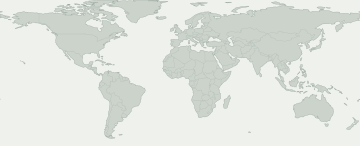
색칠된 지역을 선택하면 펌웨어 기록을 볼 수 있습니다. 파란색은 국가별 기록이 아닌 유럽이나 코카서스 같은 넓은 시장을 나타냅니다.
여러 국가에 걸친 펌웨어 시장
시장을 선택해 출처 기록을 확인하세요. 색칠된 지역 안에서도 제공 여부는 다를 수 있습니다.
이 선택에 맞는 지도상의 펌웨어 지역이 없습니다. 정확한 기록은 CSC 기록에서 확인하세요.
일부 펌웨어 지역은 지도에서 위치를 특정할 수 없습니다. 해당 기록은 표에서 볼 수 있습니다.
모델과 펌웨어 지역
Galaxy 제품을 열어 정확한 모델 코드를 비교하세요. 코드 아래에는 이 버전의 펌웨어 기록이 있는 시장이 표시됩니다. 내 모델 코드는 휴대전화 정보에서 확인할 수 있습니다.
Galaxy 제품 16개 · 정확한 모델 20개 · 펌웨어 지역 69개
출처에 기록된 빌드추적기 관측
숫자는 각 펌웨어 지역에 기록이 있는 정확한 모델 수입니다. 제품을 열어 모델과 출처를 확인하세요.
출처에서 확인된 기록이 내 휴대전화의 업데이트 가능 여부를 보장하지는 않습니다. 기기의 설정 → 소프트웨어 업데이트에서 확인하세요.
내 갤럭시 확인
내 갤럭시에 대해 무엇을 알 수 있나요?
현재 위치가 아닌 정확한 모델과 펌웨어 CSC를 선택하세요.
이 릴리스를 확인할 기기를 선택하세요.
배포 변화
기록된 배포 활동
각 모델/지역 조합의 최초 확인 기록입니다. 변경 없는 반복 확인은 합계에 포함하지 않습니다.
- 4
- 1
- 1
- 1
- 1
- 2
- 7
- 1
- 1
- 1
- 2
- 1
모델별 확인 현황
펌웨어 기록이 있는 갤럭시 기종
기종을 펼치면 정확한 모델, CSC, 최초 빌드, 기록 날짜와 출처를 볼 수 있습니다.
Galaxy A10s3 모델/지역 조합
Galaxy Fold2 모델/지역 조합
Galaxy M315 모델/지역 조합
Galaxy Note10 5G3 모델/지역 조합
Galaxy Note10+ 5G2 모델/지역 조합
Galaxy Note93 모델/지역 조합
Galaxy S103 모델/지역 조합
Galaxy S10 5G3 모델/지역 조합
Galaxy S10+3 모델/지역 조합
Galaxy S10e2 모델/지역 조합
Galaxy S93 모델/지역 조합
Galaxy S9+2 모델/지역 조합
Galaxy Tab A 10.1 (2019)3 모델/지역 조합
Galaxy Tab A 8.4 (2020)9 모델/지역 조합
SM-T307U / BMC
T307UVLU3BTH5빌드 게시 날짜SM-T307U / CHRT307UVLU3BTH5빌드 게시 날짜SM-T307U / FMCT307UVLU3BTH5빌드 게시 날짜SM-T307U / GLWT307UVLU3BTH5빌드 게시 날짜SM-T307U / KDOT307UVLU3BTH5빌드 게시 날짜SM-T307U / RWCT307UVLU3BTH5빌드 게시 날짜SM-T307U / TLST307UVLU3BTH5빌드 게시 날짜SM-T307U / TMBT307USQU3BTH7빌드 게시 날짜SM-T307U / VMCT307UVLU3BTH5빌드 게시 날짜확인 기록 보기 →Galaxy Tab A8 (2019)74 모델/지역 조합
SM-T290 / AFG
T290XXU3BTG1빌드 게시 날짜SM-T290 / AROT290XXU3BTG1빌드 게시 날짜SM-T290 / BGLT290XXU3BTG1빌드 게시 날짜SM-T290 / BTUT290XXU3BTG1빌드 게시 날짜SM-T290 / CHNT290ZCU3BTG1빌드 게시 날짜SM-T290 / CHOT290XXU3BTG1빌드 게시 날짜SM-T290 / COOT290XXU3BTG1빌드 게시 날짜SM-T290 / EONT290XXU3BTG1빌드 게시 날짜SM-T290 / ILOT290XXU3BTG1빌드 게시 날짜SM-T290 / ITVT290XXU3BTG1빌드 게시 날짜SM-T290 / KSAT290XXU3BTG1빌드 게시 날짜SM-T290 / PHET290XXU3BTG1빌드 게시 날짜SM-T290 / PHNT290XXU3BTG1빌드 게시 날짜SM-T290 / ROMT290XXU3BTG1빌드 게시 날짜SM-T290 / SEBT290XXU3BTG1빌드 게시 날짜SM-T290 / SEET290XXU3BTG1빌드 게시 날짜SM-T290 / SEKT290XXU3BTG1빌드 게시 날짜SM-T290 / SERT290XXU3BTG1빌드 게시 날짜SM-T290 / SIOT290XXU3BTG1빌드 게시 날짜SM-T290 / SKZT290XXU3BTG1빌드 게시 날짜SM-T290 / TPHT290XXU3BTG1빌드 게시 날짜SM-T290 / TURT290XXU3BTG1빌드 게시 날짜SM-T290 / UPOT290XXU3BTG1빌드 게시 날짜SM-T290 / XART290XXU3BTG1빌드 게시 날짜SM-T290 / XEHT290XXU3BTG1빌드 게시 날짜SM-T290 / XEOT290XXU3BTG1빌드 게시 날짜SM-T290 / XFAT290XXU3BTG1빌드 게시 날짜SM-T290 / XSAT290XXU3BTG1빌드 게시 날짜SM-T290 / ZTOT290XXU3BTG1빌드 게시 날짜SM-T295 / ACRT295XXU3BTFE빌드 게시 날짜SM-T295 / AFGT295XXU3BTFE빌드 게시 날짜SM-T295 / AFRT295XXU3BTFE빌드 게시 날짜SM-T295 / AUTT295XXU3BTFG빌드 게시 날짜SM-T295 / BGLT295XXU3BTFG빌드 게시 날짜SM-T295 / BNGT295XXU3BTFE빌드 게시 날짜SM-T295 / BRIT295XXU3BTFE빌드 게시 날짜SM-T295 / BTCT295XXU3BTFE빌드 게시 날짜SM-T295 / CACT295XXU3BTFG빌드 게시 날짜SM-T295 / CAMT295XXU3BTFE빌드 게시 날짜SM-T295 / CAUT295XXU3BTFG빌드 게시 날짜SM-T295 / DBTT295XXU3BTFG빌드 게시 날짜SM-T295 / EURT295XXU3BTFG빌드 게시 날짜SM-T295 / ILOT295XXU3BTFE빌드 게시 날짜SM-T295 / INST295XXU3BTFE빌드 게시 날짜SM-T295 / ITVT295XXU3BTFG빌드 게시 날짜SM-T295 / KSAT295XXU3BTFE빌드 게시 날짜SM-T295 / LUXT295XXU3BTFG빌드 게시 날짜SM-T295 / MIDT295XXU3BTFE빌드 게시 날짜SM-T295 / MM1T295XXU3BTFE빌드 게시 날짜SM-T295 / NPLT295XXU3BTFE빌드 게시 날짜SM-T295 / PHET295XXU3BTFG빌드 게시 날짜SM-T295 / ROMT295XXU3BTFG빌드 게시 날짜SM-T295 / SEBT295XXU3BTFG빌드 게시 날짜SM-T295 / SEKT295XXU3BTFG빌드 게시 날짜SM-T295 / SERT295XXU3BTFG빌드 게시 날짜SM-T295 / SIOT295XXU3BTFG빌드 게시 날짜SM-T295 / SKZT295XXU3BTFG빌드 게시 날짜SM-T295 / SLKT295XXU3BTFE빌드 게시 날짜SM-T295 / STHT295XXU3BTFE빌드 게시 날짜SM-T295 / THLT295XXU3BTFE빌드 게시 날짜SM-T295 / TPHT295XXU3BTFG빌드 게시 날짜SM-T295 / TUNT295XXU3BTFE빌드 게시 날짜SM-T295 / XEFT295XXU3BTFG빌드 게시 날짜SM-T295 / XEHT295XXU3BTFG빌드 게시 날짜SM-T295 / XEOT295XXU3BTFG빌드 게시 날짜SM-T295 / XFAT295XXU3BTFE빌드 게시 날짜SM-T295 / XFVT295XXU3BTFE빌드 게시 날짜SM-T295 / XIDT295XXU3BTFE빌드 게시 날짜SM-T295 / XMET295XXU3BTFE빌드 게시 날짜SM-T295 / XSAT295XXU3BTFE빌드 게시 날짜SM-T295 / XTCT295XXU3BTFE빌드 게시 날짜SM-T295C / CHCT295CZCU3BTFE빌드 게시 날짜SM-T295C / TGYT295CZHU3BTG1빌드 게시 날짜SM-T297 / TURT297JXU3BTFE빌드 게시 날짜확인 기록 보기 →W20191 모델/지역 조합
공식 일정
공식 일정
삼성 발표는 추적 기록과 별도로 표시합니다. 발표의 적용 범위와 배포 유형을 확인하세요.
검증된 공식 일정 기록이 없습니다.
검증된 출처 메타데이터
검증된 출처 메타데이터
이 버전의 승인된 빌드 기록이며, 각각 정확한 모델, 펌웨어 지역 및 출처와 연결됩니다.
Galaxy Tab A8 (2019) · SM-T290 / PHN
T290XXU3BTG1이 정확한 모델과 펌웨어 지역의 빌드 기록입니다.
검증된 출처 메타데이터 →근거 ↗출처의 릴리스 노트
One UI 2.1 upgrade with Android 10 One UI 2.1 brings you Android 10, with exciting new features from Samsung and Google based on feedback from users like you. We recommend that you back up your important data to keep it safe during the upgrade. Some apps, including Calculator, Samsung Internet and Samsung Notes, need to be updated individually after you update your OS. Dark mode - Enhanced image, text, and color adjustments for day and night environments. Icons and colors - Clearer app icons and system colors. Accessibility - High contrast keyboards and layouts for large text have been improved. Device care - The battery usage graph now provides more detailed information. Camera - Added the ability to edit the modes that appear at the bottom of the screen. - Provided a More tab so you can quickly access hidden modes from the preview screen. Internet - Customize the quick menu to get instant access to the features you use the most. - Get more information from the app bar. My Files - Added more filters you can use while searching to help you find things quickly. Calculator - Added speed and time units to the unit converter.
Galaxy Tab A8 (2019) · SM-T295 / BNG
T295XXU3BTFE이 정확한 모델과 펌웨어 지역의 빌드 기록입니다.
검증된 출처 메타데이터 →근거 ↗출처의 릴리스 노트
One UI 2.1 upgrade with Android 10 One UI 2.1 brings you Android 10, with exciting new features from Samsung and Google based on feedback from users like you. We recommend that you back up your important data to keep it safe during the upgrade. Some apps, including Calculator, Samsung Internet, and Samsung Notes, need to be updated individually after you update your OS. Dark mode - Enhanced image, text, and color adjustments for day and night environments. Icons and colors - Clearer app icons and system colors. Device care - The battery usage graph now provides more detailed information. Camera - Added the ability to edit the modes that appear at the bottom of the screen. - Provided a More tab so you can quickly access hidden modes from the preview screen. Internet - Customize the quick menu to get instant access to the features you use the most. - Get more information from the app bar. My Files - Added more filters you can use while searching to help you find things quickly. Calculator - Added speed and time units to the unit converter. Quick Share - Files can now be quickly and easily shared with nearby Samsung devices using Quick Share.
Galaxy Tab A8 (2019) · SM-T295 / XEO
T295XXU3BTFG이 정확한 모델과 펌웨어 지역의 빌드 기록입니다.
검증된 출처 메타데이터 →근거 ↗출처의 릴리스 노트
One UI 2.1 upgrade with Android 10 One UI 2.1 brings you Android 10, with exciting new features from Samsung and Google based on feedback from users like you. We recommend that you back up your important data to keep it safe during the upgrade. Some apps, including Calculator, Samsung Internet, and Samsung Notes, need to be updated individually after you update your OS. Dark mode - Enhanced image, text, and color adjustments for day and night environments. Icons and colors - Clearer app icons and system colors. Device care - The battery usage graph now provides more detailed information. Camera - Added the ability to edit the modes that appear at the bottom of the screen. - Provided a More tab so you can quickly access hidden modes from the preview screen. Internet - Customize the quick menu to get instant access to the features you use the most. - Get more information from the app bar. My Files - Added more filters you can use while searching to help you find things quickly. Calculator - Added speed and time units to the unit converter. Quick Share - Files can now be quickly and easily shared with nearby Samsung devices using Quick Share.
Galaxy Tab A8 (2019) · SM-T290 / KSA
T290XXU3BTG1이 정확한 모델과 펌웨어 지역의 빌드 기록입니다.
검증된 출처 메타데이터 →근거 ↗출처의 릴리스 노트
One UI 2.1 upgrade with Android 10 One UI 2.1 brings you Android 10, with exciting new features from Samsung and Google based on feedback from users like you. We recommend that you back up your important data to keep it safe during the upgrade. Some apps, including Calculator, Samsung Internet and Samsung Notes, need to be updated individually after you update your OS. Dark mode - Enhanced image, text, and color adjustments for day and night environments. Icons and colors - Clearer app icons and system colors. Accessibility - High contrast keyboards and layouts for large text have been improved. Device care - The battery usage graph now provides more detailed information. Camera - Added the ability to edit the modes that appear at the bottom of the screen. - Provided a More tab so you can quickly access hidden modes from the preview screen. Internet - Customize the quick menu to get instant access to the features you use the most. - Get more information from the app bar. My Files - Added more filters you can use while searching to help you find things quickly. Calculator - Added speed and time units to the unit converter.
Galaxy Tab A 10.1 (2019) · SM-T515N / SKC
T515NKSU4BTFK이 정확한 모델과 펌웨어 지역의 빌드 기록입니다.
검증된 출처 메타데이터 →근거 ↗출처의 릴리스 노트
One UI 2.1 업그레이드 (안드로이드 10) One UI 2.1 적용되었습니다. 삼성과 Google의 안드로이드 10 OS에서 준비한 유용한 기능을 사용해 보세요. 업그레이드를 진행할 때 중요한 데이터는 미리 백업해 주세요. 일부 앱의 경우, 소프트웨어를 업데이트하기 전에 반드시 앱별로 자체 업데이트를 진행해야 합니다. (계산기, 삼성 인터넷, Samsung Notes 등) ※ Samsung Members 앱 미로그인 상태시 업그레이드 후 앱이 삭제 될 수 있습니다. 이런 경우 Galaxy Store 또는 Play 스토어에서 Samsung Members 앱 다운로드 후 사용하시기 바랍니다. 다크 모드 - 주변 환경에 맞춰 눈이 편안하도록 이미지, 텍스트, 색상 개선 - 배경화면, 위젯, 알림 등의 전체적인 톤을 어둡게 조절 아이콘 및 색상 - 앱 아이콘과 시스템 색상이 선명해짐 - 화면을 최대한 활용할 수 있도록 제목과 버튼의 레이아웃 개선 재미있는 애니메이션 - 즐거운 사용 경험을 위한 재미있는 애니메이션 제공 전체 화면 제스처 - 새로운 방식의 내비게이션 제스처 추가 인터랙션 강화 - 큰 화면에서도 간편하게 조작할 수 있도록 인터랙션 개선 - 버튼 등 필요한 요소에 집중할 수 있도록 화면 구성 개선 접근성 - 고대비 키보드의 글자 크기 및 구성 개선 - 실제로 대화할 때 상대방의 목소리를 텍스트로 실시간 변환해주는 기능 추가 배경화면별 텍스트 최적화 - One UI에서는 배경화면의 색상을 인식하여, 텍스트 색상을 자동으로 최적화 미디어 및 디바이스 - SmartThings 패널이 미디어 및 디바이스 패널로 변경됨 - 미디어: 다른 디바이스에서 재생 중인 음악과 동영상을 내 테블릿에서 제어 가능 - 디바이스: 빠른 설정창에서 SmartThings 디바이스들의 상태를 바로 확인하고 제어 가능 디바이스 케어 - 배터리 사용량을 자세하게 확인 가능한 그래프 추가 디지털 웰빙 - 테블릿 사용량에 대한 목표 설정 및 관리 가능 - 테블릿을 덜 사용하고 다른 일에 집중할 수 있도록 도와주는 집중 모드 제공 - 내 아이의 스마트한 휴대전화 사용 습관을 위한 새로운 아이보호 기능 추가 카메라 - 모드를 자유롭게 활용할 수 있도록 화면 하단의 모드 순서 변경 가능 - 촬영 화면에서 모드에 쉽게 접근할 수 있도록 더보기 탭 제공 - 촬영에 집중할 수 있도록 촬영 화면 개선 인터넷 - 자주 사용하는 기능에 빠르게 접근할 수 있도록 메뉴 직접 설정 기능 추가 - 앱 바에서 자세한 정보 확인 가능 - 더 다양한 기능은 Galaxy Store에서 다운로드 가능 연락처 - 연락처가 완전히 삭제되기 전에 15일 동안 보관되는 휴지통 기능 추가 캘린더 - 일정을 추가하지 않아도 특정 날짜에 스티커 부착 가능 - 전화벨소리를 일정 알림에 사용 가능 - 관심있는 캘린더 구독 기능 제공 리마인더 - 리마인더 반복 설정 시 다양한 조건이 추가 - 장소 기반으로 리마인더 설정 시 시간대까지 설정 가능하도록 개선 - 리마인더 공유 대상이 가족 및 다른 공유 그룹까지 확장 - 알림없이 날짜만 지정된 리마인더 설정 가능 내파일 - 실수로 파일을 지웠을 때 복원할 수 있도록 휴지통 기능이 추가됨 - 원하는 항목을 쉽게 찾을 수 있도록 다양한 검색 필터 추가됨 - 파일이나 폴더를 다른 위치로 이동하거나 복사할 때 여러 작업을 동시에 진행 가능 계산기 - 단위 계산기에 속도 및 시간 항목 추가 커넥티드 카 - 안드로이드 오토 기능 탑재
Galaxy Tab A 8.4 (2020) · SM-T307U / FMC
T307UVLU3BTH5이 정확한 모델과 펌웨어 지역의 빌드 기록입니다.
검증된 출처 메타데이터 →근거 ↗출처의 릴리스 노트
One UI 2.1 upgrade with Android 10 One UI 2.1 brings you Android 10, with exciting new features from Samsung and Google based on feedback from users like you. We recommend that you back up your important data to keep it safe during the upgrade. Some apps, including Calculator, Samsung Internet, Samsung Health and Samsung Notes, need to be updated individually after you update your OS. Here's what's new. Dark mode - Enhanced image, text, and color adjustments for day and night environments. - Darkened wallpapers, widgets, and alarms while Dark mode is on. Icons and colors - Clearer app icons and system colors. - Improved layouts for titles and buttons to eliminate wasted screen space. Smoother animations - Enhanced animations with a playful touch. Full screen gestures - Added new navigation gestures. Refined interactions - Navigate more comfortably on large screens with minimal finger movement. - Easily focus on what matters with clearly highlighted buttons. Accessibility - High contrast keyboards and layouts for large text have been improved. - Listen to live speech and display it as text. Better text over wallpapers - See text more clearly against wallpaper, as One UI automatically adjusts font colors based on light and dark areas and color contrast in the image below. Media and devices - Replaced the SmartThings panel with the Media and Devices. - Media: Control music and videos playing on your phone as well as other devices. - Devices: Check and control your SmartThings devices directly from the quick panel. Device care - The battery usage graph now provides more detailed information. - Added battery limit setting and other enhancements for Wireless PowerShare. Digital wellbeing - Set goals to keep your phone usage in check. - Use Focus mode to help avoid distractions from your phone. - Keep an eye on your kids with new parental controls. Camera - Added the ability to edit the modes that appear at the bottom of the screen. - Provided a More tab so you can quickly access hidden modes from the preview screen. - Improved the layout so you can focus on taking pictures without the settings getting in the way. Internet - Customize the quick menu to get instant access to the features you use the most. - Get more information from the app bar. - Install add-ons from the Galaxy Store to get even more features. Samsung Contacts - Added Trash feature for Contacts. Contacts that you delete will stay in the trash for 15 days before being deleted forever. Calendar - Stickers can be added to a date without creating an event. - Ringtones can be used for event alerts. Reminder - More options are available for repeating reminders. - Set location-based reminders for a specific period of time. - Share reminders with your family group and other sharing groups. - Set reminders for a specific date without an alert. My Files - Created a Trash feature so you can restore files if you delete something by mistake. - Added more filters you can use while searching to help you find things quickly. - You can now copy or move multiple files and folders to different destinations at the same time. Calculator - Added speed and time units to the unit converter.
Galaxy Tab A8 (2019) · SM-T295 / CAM
T295XXU3BTFE이 정확한 모델과 펌웨어 지역의 빌드 기록입니다.
검증된 출처 메타데이터 →근거 ↗출처의 릴리스 노트
One UI 2.1 upgrade with Android 10 One UI 2.1 brings you Android 10, with exciting new features from Samsung and Google based on feedback from users like you. We recommend that you back up your important data to keep it safe during the upgrade. Some apps, including Calculator, Samsung Internet, and Samsung Notes, need to be updated individually after you update your OS. Dark mode - Enhanced image, text, and color adjustments for day and night environments. Icons and colors - Clearer app icons and system colors. Device care - The battery usage graph now provides more detailed information. Camera - Added the ability to edit the modes that appear at the bottom of the screen. - Provided a More tab so you can quickly access hidden modes from the preview screen. Internet - Customize the quick menu to get instant access to the features you use the most. - Get more information from the app bar. My Files - Added more filters you can use while searching to help you find things quickly. Calculator - Added speed and time units to the unit converter. Quick Share - Files can now be quickly and easily shared with nearby Samsung devices using Quick Share.
Galaxy Tab A8 (2019) · SM-T290 / UPO
T290XXU3BTG1이 정확한 모델과 펌웨어 지역의 빌드 기록입니다.
검증된 출처 메타데이터 →근거 ↗출처의 릴리스 노트
One UI 2.1 upgrade with Android 10 One UI 2.1 brings you Android 10, with exciting new features from Samsung and Google based on feedback from users like you. We recommend that you back up your important data to keep it safe during the upgrade. Some apps, including Calculator, Samsung Internet and Samsung Notes, need to be updated individually after you update your OS. Dark mode - Enhanced image, text, and color adjustments for day and night environments. Icons and colors - Clearer app icons and system colors. Accessibility - High contrast keyboards and layouts for large text have been improved. Device care - The battery usage graph now provides more detailed information. Camera - Added the ability to edit the modes that appear at the bottom of the screen. - Provided a More tab so you can quickly access hidden modes from the preview screen. Internet - Customize the quick menu to get instant access to the features you use the most. - Get more information from the app bar. My Files - Added more filters you can use while searching to help you find things quickly. Calculator - Added speed and time units to the unit converter.
Galaxy Tab A8 (2019) · SM-T295 / SKZ
T295XXU3BTFG이 정확한 모델과 펌웨어 지역의 빌드 기록입니다.
검증된 출처 메타데이터 →근거 ↗출처의 릴리스 노트
One UI 2.1 upgrade with Android 10 One UI 2.1 brings you Android 10, with exciting new features from Samsung and Google based on feedback from users like you. We recommend that you back up your important data to keep it safe during the upgrade. Some apps, including Calculator, Samsung Internet, and Samsung Notes, need to be updated individually after you update your OS. Dark mode - Enhanced image, text, and color adjustments for day and night environments. Icons and colors - Clearer app icons and system colors. Device care - The battery usage graph now provides more detailed information. Camera - Added the ability to edit the modes that appear at the bottom of the screen. - Provided a More tab so you can quickly access hidden modes from the preview screen. Internet - Customize the quick menu to get instant access to the features you use the most. - Get more information from the app bar. My Files - Added more filters you can use while searching to help you find things quickly. Calculator - Added speed and time units to the unit converter. Quick Share - Files can now be quickly and easily shared with nearby Samsung devices using Quick Share.
Galaxy Tab A8 (2019) · SM-T295 / XEH
T295XXU3BTFG이 정확한 모델과 펌웨어 지역의 빌드 기록입니다.
검증된 출처 메타데이터 →근거 ↗출처의 릴리스 노트
One UI 2.1 upgrade with Android 10 One UI 2.1 brings you Android 10, with exciting new features from Samsung and Google based on feedback from users like you. We recommend that you back up your important data to keep it safe during the upgrade. Some apps, including Calculator, Samsung Internet, and Samsung Notes, need to be updated individually after you update your OS. Dark mode - Enhanced image, text, and color adjustments for day and night environments. Icons and colors - Clearer app icons and system colors. Device care - The battery usage graph now provides more detailed information. Camera - Added the ability to edit the modes that appear at the bottom of the screen. - Provided a More tab so you can quickly access hidden modes from the preview screen. Internet - Customize the quick menu to get instant access to the features you use the most. - Get more information from the app bar. My Files - Added more filters you can use while searching to help you find things quickly. Calculator - Added speed and time units to the unit converter. Quick Share - Files can now be quickly and easily shared with nearby Samsung devices using Quick Share.
Galaxy Tab A8 (2019) · SM-T295 / CAU
T295XXU3BTFG이 정확한 모델과 펌웨어 지역의 빌드 기록입니다.
검증된 출처 메타데이터 →근거 ↗출처의 릴리스 노트
One UI 2.1 upgrade with Android 10 One UI 2.1 brings you Android 10, with exciting new features from Samsung and Google based on feedback from users like you. We recommend that you back up your important data to keep it safe during the upgrade. Some apps, including Calculator, Samsung Internet, and Samsung Notes, need to be updated individually after you update your OS. Dark mode - Enhanced image, text, and color adjustments for day and night environments. Icons and colors - Clearer app icons and system colors. Device care - The battery usage graph now provides more detailed information. Camera - Added the ability to edit the modes that appear at the bottom of the screen. - Provided a More tab so you can quickly access hidden modes from the preview screen. Internet - Customize the quick menu to get instant access to the features you use the most. - Get more information from the app bar. My Files - Added more filters you can use while searching to help you find things quickly. Calculator - Added speed and time units to the unit converter. Quick Share - Files can now be quickly and easily shared with nearby Samsung devices using Quick Share.
Galaxy Tab A8 (2019) · SM-T290 / XAR
T290XXU3BTG1이 정확한 모델과 펌웨어 지역의 빌드 기록입니다.
검증된 출처 메타데이터 →근거 ↗출처의 릴리스 노트
One UI 2.1 upgrade with Android 10 One UI 2.1 brings you Android 10, with exciting new features from Samsung and Google based on feedback from users like you. We recommend that you back up your important data to keep it safe during the upgrade. Some apps, including Calculator, Samsung Internet and Samsung Notes, need to be updated individually after you update your OS. Dark mode - Enhanced image, text, and color adjustments for day and night environments. Icons and colors - Clearer app icons and system colors. Accessibility - High contrast keyboards and layouts for large text have been improved. Device care - The battery usage graph now provides more detailed information. Camera - Added the ability to edit the modes that appear at the bottom of the screen. - Provided a More tab so you can quickly access hidden modes from the preview screen. Internet - Customize the quick menu to get instant access to the features you use the most. - Get more information from the app bar. My Files - Added more filters you can use while searching to help you find things quickly. Calculator - Added speed and time units to the unit converter.
Galaxy M31 · SM-M315F / INS
M315FXXU2ATI4이 정확한 모델과 펌웨어 지역의 빌드 기록입니다.
검증된 출처 메타데이터 →근거 ↗출처의 릴리스 노트
One UI 2.1 upgrade with Android 10 One UI 2.1 brings you Android 10, with exciting new features from Samsung and Google based on feedback from users like you. We recommend that you back up your important data to keep it safe during the upgrade. Some apps, including Calculator, Samsung Internet, Samsung Health and Samsung Notes, need to be updated individually after you update your OS. Here's what's new. Dark mode - Night mode name changed to Dark mode. - Enhanced image, text, and color adjustments for day and night environments. - Darkened wallpapers, widgets, and alarms while Dark mode is on. Icons and colors - Clearer app icons and system colors. - Improved layouts for titles and buttons to eliminate wasted screen space. Full screen gestures - Added new navigation gestures. One-handed mode - Settings moved to Settings > Advanced features > One-handed mode. Device care - The battery usage graph now provides more detailed information. Digital wellbeing - Set goals to keep your phone usage in check. - Use Focus mode to help avoid distractions from your phone. - Keep an eye on your kids with new parental controls. Samsung Contacts - Added Trash feature for Contacts. Contacts that you delete will stay in the trash for 15 days before being deleted forever. The security of your device has been improved.
Galaxy Tab A8 (2019) · SM-T290 / BGL
T290XXU3BTG1이 정확한 모델과 펌웨어 지역의 빌드 기록입니다.
검증된 출처 메타데이터 →근거 ↗출처의 릴리스 노트
One UI 2.1 upgrade with Android 10 One UI 2.1 brings you Android 10, with exciting new features from Samsung and Google based on feedback from users like you. We recommend that you back up your important data to keep it safe during the upgrade. Some apps, including Calculator, Samsung Internet and Samsung Notes, need to be updated individually after you update your OS. Dark mode - Enhanced image, text, and color adjustments for day and night environments. Icons and colors - Clearer app icons and system colors. Accessibility - High contrast keyboards and layouts for large text have been improved. Device care - The battery usage graph now provides more detailed information. Camera - Added the ability to edit the modes that appear at the bottom of the screen. - Provided a More tab so you can quickly access hidden modes from the preview screen. Internet - Customize the quick menu to get instant access to the features you use the most. - Get more information from the app bar. My Files - Added more filters you can use while searching to help you find things quickly. Calculator - Added speed and time units to the unit converter.
Galaxy Tab A8 (2019) · SM-T290 / ROM
T290XXU3BTG1이 정확한 모델과 펌웨어 지역의 빌드 기록입니다.
검증된 출처 메타데이터 →근거 ↗출처의 릴리스 노트
One UI 2.1 upgrade with Android 10 One UI 2.1 brings you Android 10, with exciting new features from Samsung and Google based on feedback from users like you. We recommend that you back up your important data to keep it safe during the upgrade. Some apps, including Calculator, Samsung Internet and Samsung Notes, need to be updated individually after you update your OS. Dark mode - Enhanced image, text, and color adjustments for day and night environments. Icons and colors - Clearer app icons and system colors. Accessibility - High contrast keyboards and layouts for large text have been improved. Device care - The battery usage graph now provides more detailed information. Camera - Added the ability to edit the modes that appear at the bottom of the screen. - Provided a More tab so you can quickly access hidden modes from the preview screen. Internet - Customize the quick menu to get instant access to the features you use the most. - Get more information from the app bar. My Files - Added more filters you can use while searching to help you find things quickly. Calculator - Added speed and time units to the unit converter.
Galaxy Tab A8 (2019) · SM-T295 / BRI
T295XXU3BTFE이 정확한 모델과 펌웨어 지역의 빌드 기록입니다.
검증된 출처 메타데이터 →근거 ↗출처의 릴리스 노트
One UI 2.1 upgrade with Android 10 One UI 2.1 brings you Android 10, with exciting new features from Samsung and Google based on feedback from users like you. We recommend that you back up your important data to keep it safe during the upgrade. Some apps, including Calculator, Samsung Internet, and Samsung Notes, need to be updated individually after you update your OS. Dark mode - Enhanced image, text, and color adjustments for day and night environments. Icons and colors - Clearer app icons and system colors. Device care - The battery usage graph now provides more detailed information. Camera - Added the ability to edit the modes that appear at the bottom of the screen. - Provided a More tab so you can quickly access hidden modes from the preview screen. Internet - Customize the quick menu to get instant access to the features you use the most. - Get more information from the app bar. My Files - Added more filters you can use while searching to help you find things quickly. Calculator - Added speed and time units to the unit converter. Quick Share - Files can now be quickly and easily shared with nearby Samsung devices using Quick Share.
Galaxy Tab A8 (2019) · SM-T295 / DBT
T295XXU3BTFG이 정확한 모델과 펌웨어 지역의 빌드 기록입니다.
검증된 출처 메타데이터 →근거 ↗출처의 릴리스 노트
One UI 2.1 upgrade with Android 10 One UI 2.1 brings you Android 10, with exciting new features from Samsung and Google based on feedback from users like you. We recommend that you back up your important data to keep it safe during the upgrade. Some apps, including Calculator, Samsung Internet, and Samsung Notes, need to be updated individually after you update your OS. Dark mode - Enhanced image, text, and color adjustments for day and night environments. Icons and colors - Clearer app icons and system colors. Device care - The battery usage graph now provides more detailed information. Camera - Added the ability to edit the modes that appear at the bottom of the screen. - Provided a More tab so you can quickly access hidden modes from the preview screen. Internet - Customize the quick menu to get instant access to the features you use the most. - Get more information from the app bar. My Files - Added more filters you can use while searching to help you find things quickly. Calculator - Added speed and time units to the unit converter. Quick Share - Files can now be quickly and easily shared with nearby Samsung devices using Quick Share.
Galaxy S9+ · SM-G965N / SKC
G965NKSU3ETF4이 정확한 모델과 펌웨어 지역의 빌드 기록입니다.
검증된 출처 메타데이터 →근거 ↗출처의 릴리스 노트
• 단말 보안 관련 안정화 코드 적용 • One UI 2.1 적용 및 다양한 새로운 기능 제공 AR 이모지 - AR 이모지 버전이 업데이트되어 수동 편집 기능 추가, 얼굴 표정 인식 강화 등 기능 개선 제공 ※ AR 이모지 버전 업데이트에 따라 기존 저장한 AR 이모지는 AR 이모지앱 진입시 모두 삭제됩니다. 업데이트된 카메라 기능 - AR 존, 싱글테이크, 프로 동영상, 마이 필터, 셀피 색감, 개선된 야간 촬영 등 다양한 기능 추가 갤러리 - 유사한 이미지를 그룹으로 묶어 보여주는 뷰 제공 - 여러 그룹 또는 그룹과 앨범을 새로운 하나의 그룹으로 묶어서 관리할 수 있는 기능 추가 - 시간, 장소 등 사진의 다양한 정보 기반 검색 기능 추가 - 고해상도 이미지에서 원하는 부분을 확대하여 잘라내는 Quick crop 기능 제공 삼성 키보드 - 다국어 번역 기능 추가 - Emoji, sticker 등 다양한 항목을 한번에 검색하는 기능 추가 - 글자 입력취소/재입력 기능 추가(두 손가락을 키보드 왼쪽/오른쪽으로 밀어 동작) - Samsung Pass를 바로 실행할 수 있는 아이콘 추가 Quick Share - 쉽고 빠르게 주변의 여러 다른 삼성 기기와 파일 공유 기능 제공 Music Share - 나의 Bluetooth 스피커를 공유하여 친구의 음악 재생 가능
Galaxy S10+ · SM-G975N / SKC
G975NKSU4CTC9이 정확한 모델과 펌웨어 지역의 빌드 기록입니다.
검증된 출처 메타데이터 →근거 ↗출처의 릴리스 노트
• One UI 2.1 적용 및 다양한 새로운 기능 제공 ※ 업데이트 완료시 보안 정책이 강화되어 보안이 낮은 이전 소프트웨어 버전으로 다운그레이드 할 수 없습니다. ※ 업데이트 후 배경화면 이미지가 가로로 회전되어 표시될 수 있으니, Galaxy Store 통해 "One UI Home" 앱 업데이트 후 사용해 주세요. AR 이모지 - AR 이모지 버전이 업데이트되어 수동 편집 기능 추가, 얼굴 표정 인식 강화 등 기능 개선 제공 ※ AR 이모지 버전 업데이트에 따라 기존 저장한 AR 이모지는 AR 이모지앱 진입시 모두 삭제됩니다. 업데이트된 카메라 기능 - AR 존, 싱글테이크, 프로 동영상, 마이 필터, 셀피 색감, 야간 타임랩스, 전면 동영상 FHD/UHD 60fps 촬영 모드 등 다양한 기능 추가 갤러리 - 유사한 이미지를 그룹으로 묶어 보여주는 뷰 제공 - 여러 그룹 또는 그룹과 앨범을 새로운 하나의 그룹으로 묶어서 관리할 수 있는 기능 추가 - 시간, 장소 등 사진의 다양한 정보 기반 검색 기능 추가 - 고해상도 이미지에서 원하는 부분을 확대하여 잘라내는 Quick crop 기능 제공 삼성 키보드 - 다국어 번역 기능 추가 - Emoji, sticker 등 다양한 항목을 한번에 검색하는 기능 추가 - 글자 입력취소/재입력 기능 추가(두 손가락을 키보드 왼쪽/오른쪽으로 밀어 동작) - Samsung Pass를 바로 실행할 수 있는 아이콘 추가 - 나랏글, 베가 레이아웃 중앙정렬 설정 추가 Quick Share - 쉽고 빠르게 주변의 여러 다른 삼성 기기와 파일 공유 기능 제공 Music Share - 나의 Bluetooth 스피커를 공유하여 친구의 음악 재생 가능
Galaxy Tab A8 (2019) · SM-T295 / XEF
T295XXU3BTFG이 정확한 모델과 펌웨어 지역의 빌드 기록입니다.
검증된 출처 메타데이터 →근거 ↗출처의 릴리스 노트
One UI 2.1 upgrade with Android 10 One UI 2.1 brings you Android 10, with exciting new features from Samsung and Google based on feedback from users like you. We recommend that you back up your important data to keep it safe during the upgrade. Some apps, including Calculator, Samsung Internet, and Samsung Notes, need to be updated individually after you update your OS. Dark mode - Enhanced image, text, and color adjustments for day and night environments. Icons and colors - Clearer app icons and system colors. Device care - The battery usage graph now provides more detailed information. Camera - Added the ability to edit the modes that appear at the bottom of the screen. - Provided a More tab so you can quickly access hidden modes from the preview screen. Internet - Customize the quick menu to get instant access to the features you use the most. - Get more information from the app bar. My Files - Added more filters you can use while searching to help you find things quickly. Calculator - Added speed and time units to the unit converter. Quick Share - Files can now be quickly and easily shared with nearby Samsung devices using Quick Share.
확인일
최신 확인 기록
이 기준 시점에는 승인된 릴리스 기록이 없습니다.